
You Don’t Need to Code Anymore — You Need to Communicate
How Emergent AI Is Transforming App Development for Everyone
Estimated read time: 7 minutes
Software development is changing faster than most people realise. What once required years of technical training, a team of engineers, and weeks of setup time can now begin with a single, well-written sentence. That sentence goes to an AI. The AI builds the software.
This isn’t science fiction. It’s what’s happening right now — and Emergent AI is one of the platforms leading the charge.
Whether you’re a founder with an idea and no technical background, a developer tired of writing the same boilerplate for the tenth time, or a product manager who’s always had to wait on engineering — this changes things for you. Let’s break down exactly how.
What Is Emergent AI?
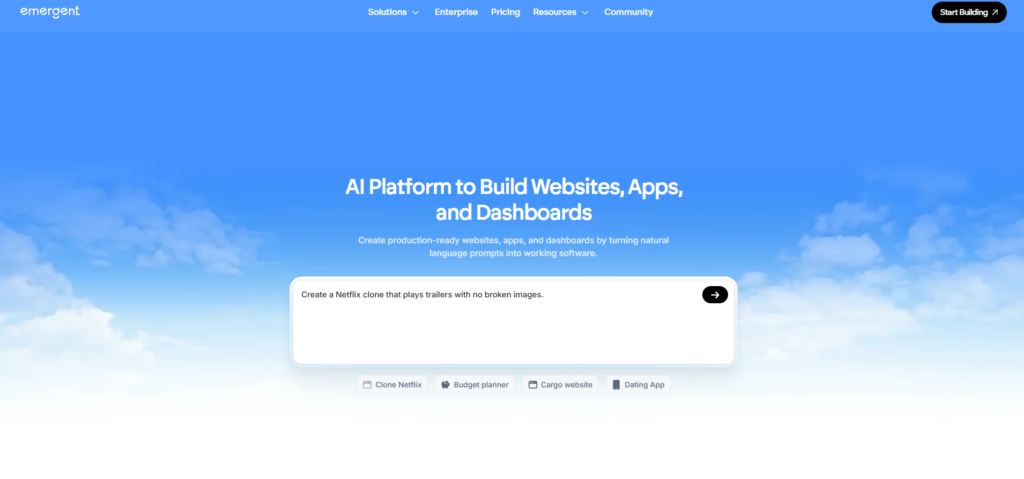
Emergent AI is an AI-powered application development platform designed to automate the most time-consuming and technically demanding parts of building software. Instead of manually writing backend logic, configuring servers, or designing databases from scratch, you describe what you want in plain English — and the platform’s AI agents generate the technical foundation for you.
It’s not a no-code drag-and-drop tool. It’s something more powerful: a system that understands software architecture and translates your intent into real, scalable code and infrastructure.
What Emergent AI can build for you:
- Backend systems and server-side logic
- REST APIs — structured, documented, and ready to connect
- Database schemas tailored to your specific use case
- Authentication systems including email login, OAuth, and password reset
- Automation workflows and background processing
- AI-powered features like recommendation engines and smart search
- Deployment-ready application architecture
👉 Ready to start building? Visit Emergent AI and turn your idea into an application today.
Who Is Emergent AI For?
Emergent AI was built for a wide range of creators — not just developers.
Startup founders can prototype and validate ideas without hiring an engineering team first. Solo builders and indie hackers can ship faster than ever. Product managers can mock up real systems, not just wireframes. Experienced developers can skip the repetitive groundwork and focus on the logic that actually differentiates their product.
If you’ve ever had an idea for an app and felt blocked by the technical barrier between you and building it, Emergent AI was built for you.
Why Traditional Development Is Holding You Back
Before you can build the product you actually care about, traditional development forces you through a gauntlet of overhead. You have to write repetitive boilerplate that looks the same across every project, set up authentication from scratch, design and migrate databases by hand, wire together APIs, configure infrastructure and deployment pipelines, and debug integration problems that have nothing to do with your actual idea.
This overhead doesn’t discriminate. It slows down beginners and senior engineers alike. It delays launches, drains momentum, and turns creative energy into configuration fatigue.
Emergent AI doesn’t just speed this process up — it removes it. The AI handles the infrastructure layer so you can focus entirely on what makes your product different.
4. The Power of Prompts: Why What You Write Matters
In Emergent AI, your prompt is your instruction set. It’s part product requirement, part technical specification, part developer brief — and the quality of what the platform builds is directly tied to the quality of what you write.
The AI is powerful, but it doesn’t read minds. A vague instruction produces a vague result. A specific, structured prompt produces something you can actually use.
Here’s the clearest illustration of that:
Build an app.
Create a backend for a mobile task management app with user registration, login, task creation, deadlines, and completion tracking. Use REST APIs and structured database models.
The second prompt gives the AI everything it needs: a platform, a purpose, a feature list, and a technical approach. The output is incomparably better.
5. The Prompt Outline: A Structure That Always Works
Before writing any prompt, think through these four elements. This is your prompt outline — a mental checklist that ensures you never leave out something the AI needs to do its best work.
[1] Goal — What type of application or system are you building? [2] Features — What specific functionality does it need? [3] Users — Who will use it, and how will they interact with it? [4] Technical Expectations — What architecture, APIs, or standards should it follow?
When you have clear answers to all four, you’re ready to write a prompt. When one is missing, your output will reflect that gap.
Use this as your template:
“Build a [type of app] with [list of features] for [target users], using [technical approach — e.g. scalable REST APIs and structured database models].”
It sounds simple because it is. But it’s also remarkably effective.
6. Ten Real Prompt Examples (From Basic to Advanced)
These ten prompts cover a range of use cases and complexity levels. Use them as-is or adapt them to your own project.
Powerful Emergent AI Prompt Examples
1. Simple Task Manager Backend
Create a backend for a task management app with user login, task creation, deadlines, and a completion toggle. Use REST APIs and a relational database.
2. E-commerce Product Catalogue
Build a product catalogue API for an e-commerce app with categories, filters, search, and inventory tracking. Include pagination and sorting.
3. User Authentication System
Add secure authentication with email login, Google sign-in, password reset, and JWT-based session management for a web application.
4. Blog Platform API
Create a backend for a blogging platform where users can register, publish posts, add tags, leave comments, and follow other writers.
5. Booking and Scheduling System
Build a booking system for a service business with calendar availability, appointment creation, email confirmation, and cancellation handling.
6. AI Recommendation Engine
Create a recommendation system that analyses user behaviour and suggests personalised content based on browsing and interaction history.
7. SaaS Subscription Management
Build a subscription management system with free and paid tiers, Stripe integration, usage tracking, and upgrade/downgrade logic.
8. Real-time Notifications
Add a notification system to an existing app that sends in-app alerts and emails for key user events like new messages, task assignments, and deadlines.
9. Admin Dashboard Backend
Create an admin backend with user management, role-based access control, activity logs, and analytics endpoints for a multi-tenant SaaS app.
10. Full MVP Backend
Build the complete backend for a freelance marketplace app. Include user profiles for clients and freelancers, project listings, proposals, messaging, milestone tracking, and payment integration.
👉 Want to try one of these prompts right now? Go to Emergent AI and paste it in.
7. How to Build an App Step by Step With Emergent AI
A full application isn’t built in one prompt — it’s built in stages. Here’s what a typical workflow looks like:
Step 1 — Foundation: Start with the core backend. Define the main entities, the purpose, and the primary user actions. Step 2 — Authentication: Add your login and security layer as a focused follow-up prompt. Step 3 — Database: Generate your schema with relationships, constraints, and data types specified. Step 4 — APIs: Create feature-specific API endpoints, one area at a time. Step 5 — Intelligence: Layer in AI features — recommendations, search, automation. Step 6 — Review and deploy: Optimise, refine with follow-up prompts, and push to production.
| Step | Phase Name | Core Content (What You Do) | Importance | Additional Content / Best Practices |
|---|---|---|---|---|
| 1 | Foundation (Core Backend) | Define product purpose, main entities, user roles, workflows, system architecture | ⭐⭐⭐⭐⭐ Critical — sets direction for entire system | • Identify target users• Define MVP scope• Create domain models• Choose tech stack• Design system boundaries |
| Main Entities: Users, Products, Orders, Content, etc. | Prevents redesign later | Use Entity Relationship diagrams (ERD) | ||
| Primary User Actions | Defines features clearly | Example: Create, View, Update, Delete (CRUD) flows | ||
| Architecture Planning | Ensures scalability | Decide Monolith vs Microservices | ||
| API Strategy Planning | Avoids future refactoring | REST vs GraphQL decision | ||
| 2 | Authentication & Security | User login, signup, session handling | ⭐⭐⭐⭐⭐ Protects system & data | Implement authentication early |
| Authentication Methods | Controls access | Email/password, OAuth, OTP, SSO | ||
| Authorization | Role-based permissions | RBAC or ABAC models | ||
| Security Layers | Prevents attacks | JWT tokens, hashing, encryption | ||
| Data Protection | Compliance readiness | HTTPS, secure cookies | ||
| Rate Limiting | Prevents abuse | API throttling | ||
| 3 | Database Design | Create schema, tables, relations | ⭐⭐⭐⭐⭐ Data backbone | Poor schema = future performance issues |
| Relationships | Maintain data integrity | One-to-Many, Many-to-Many | ||
| Constraints | Prevent invalid data | Unique, Foreign Keys, NOT NULL | ||
| Data Types | Performance optimization | Use correct indexing | ||
| Migration Strategy | Safe updates | Versioned schema migrations | ||
| Backup Strategy | Disaster recovery | Automated backups | ||
| 4 | API Development | Build endpoints per feature | ⭐⭐⭐⭐⭐ Enables frontend communication | Develop feature-by-feature |
| REST Endpoints | Structured access | GET, POST, PUT, DELETE | ||
| Validation | Prevent bad inputs | Schema validation | ||
| Error Handling | Better UX | Standard error responses | ||
| API Documentation | Developer productivity | Swagger/OpenAPI | ||
| Versioning | Future compatibility | /v1/, /v2/ APIs | ||
| 5 | Intelligence Layer (AI) | Add AI-driven features | ⭐⭐⭐⭐ Competitive advantage | Implement after stable data |
| Recommendations | Personalised experience | ML models or embeddings | ||
| Smart Search | Better discovery | Semantic search | ||
| Automation | Reduce manual work | Auto tagging, notifications | ||
| Analytics AI | Insights | Predictive analytics | ||
| Feedback Learning | Continuous improvement | Model retraining | ||
| 6 | Review & Deployment | Optimise and release system | ⭐⭐⭐⭐⭐ Production readiness | Final quality stage |
| Performance Optimization | Faster system | Caching, indexing | ||
| Testing | Stability | Unit, Integration, E2E tests | ||
| CI/CD Pipeline | Automated deployment | GitHub Actions / Jenkins | ||
| Monitoring | Detect failures | Logs, metrics, alerts | ||
| Scaling Strategy | Handle growth | Load balancing, containers | ||
| Production Deployment | Go live | Cloud deployment (AWS/GCP/Azure) |
This conversational, iterative approach is what makes Emergent AI different from traditional development. Each stage builds naturally on the last, and you can refine any stage by simply describing what needs to change.
8. Best Practices for Getting the Most Out of Emergent AI
Think of Emergent AI as a highly capable junior developer who needs clear direction to produce their best work. These practices will consistently improve your results:
Be specific. Vague prompts produce vague outputs. Name your features explicitly rather than describing them in general terms.
Build in stages. Don’t try to describe an entire product in a single prompt. Break it into logical components and build each one in sequence.
Describe user behaviour. Don’t just list features — explain what users will actually do. “Users can create tasks, assign them to team members, and mark them complete” is more useful than “task management.”
Use follow-up prompts. If the first output isn’t quite right, refine it. Send a follow-up that clarifies or extends what was built. Iteration is built into the process.
State your technical preferences. If you want REST over GraphQL, relational over document databases, or JWT over sessions — say so. The AI will follow your lead.
9. The Bigger Picture: What This Shift Really Means
The emergence of tools like Emergent AI isn’t just a productivity story. It’s a story about access.
For most of computing history, the ability to build software was locked behind years of technical training. A brilliant idea without a developer to implement it went nowhere. That asymmetry shaped entire industries — it’s why “technical co-founder” became such a valuable and sought-after role.
That dynamic is shifting. When natural language becomes a valid input for software creation, the barrier between idea and execution collapses. The skill that matters most is no longer the ability to write code — it’s the ability to think clearly about a problem, communicate a solution precisely, and iterate quickly.
Product thinking. Clear communication. Creative problem solving. These are the core competencies of the next generation of builders.
👉 Emergent AI gives you the tools to build. Start your first project here.
10. Frequently Asked Questions
Do I need any coding experience to use Emergent AI? No. Emergent AI is designed to be accessible to non-developers. You need the ability to describe what you want clearly — that’s the core skill. Technical knowledge helps you write more precise prompts, but it’s not a requirement to get started.
How is Emergent AI different from no-code tools like Bubble or Webflow? No-code tools give you a visual interface to assemble pre-built components. Emergent AI generates actual architecture and logic from your instructions — it’s closer to having an AI engineer than a drag-and-drop builder. The output is more flexible, more scalable, and more customisable.
Can I use Emergent AI for a real production application, or just prototypes? The platform is designed to produce production-ready architecture, not just proof-of-concept demos. Many builders use it to launch real products. That said, like any generated code, reviewing and testing the output before going live is always recommended.
What happens if my first prompt doesn’t produce what I wanted? That’s completely normal — and expected. Emergent AI is built for iteration. Use a follow-up prompt to clarify, extend, or correct what was built. Think of it as a conversation, not a one-shot request.
Is Emergent AI suitable for complex applications? Yes. The more complex the application, the more value Emergent AI provides — because it automates the parts of complex systems that are the most tedious to build by hand. The key is breaking the complexity into well-defined stages and prompting each one clearly.
How do I get started? Go to emergent, describe what you want to build, and start with your first prompt. The platform will guide you from there.
Start Building Today
The future of software development is conversational, iterative, and AI-assisted. The tools exist. The barrier has dropped. The only thing between you and a working application is a well-written prompt.
If you can describe what you want to build, you can build it.

Leave a Reply