
Kinsta Review: Is This Premium WordPress Host Worth It?
You’ve probably spent hours trying to speed up your WordPress site.
You’ve installed caching plugins, optimized images, and maybe even switched themes. But your site still loads slowly during traffic spikes. Your visitors bounce. Your rankings drop. And you’re stuck troubleshooting instead of growing your business.
Kinsta is a managed WordPress hosting platform built specifically to solve these problems. It promises enterprise-level speed, security, and support without the complexity of traditional hosting.
But is it actually worth the premium price?
In this Kinsta review, I’ll walk you through everything you need to know about this hosting platform, from its standout features to honest pros and cons, so you can decide if it’s the right fit for your website.
What Is Kinsta?
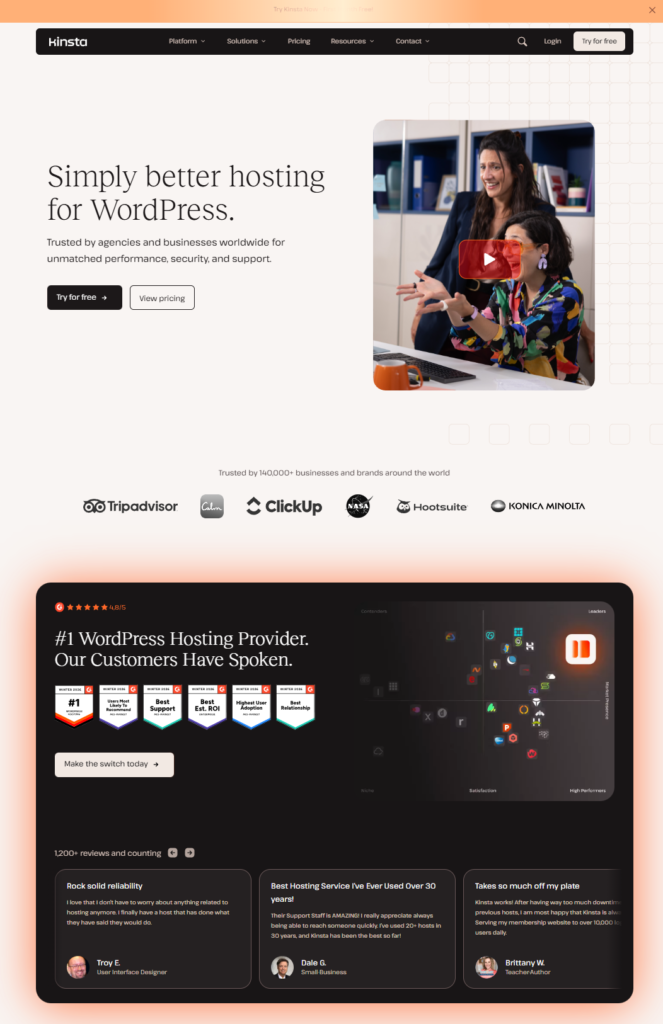
Kinsta is a premium managed WordPress hosting company that runs entirely on Google Cloud Platform infrastructure.
Unlike traditional shared hosting, Kinsta handles all the technical work for you. That means automatic backups, security monitoring, performance optimization, and expert support are all included.
The platform was built from the ground up for WordPress. It uses container-based technology, which means each site runs in its own isolated environment with dedicated resources.
This setup eliminates the “noisy neighbor” problem common with shared hosting, where one slow site can drag down everyone else on the server.
Kinsta exists to give website owners professional-grade hosting without needing a developer on staff.
Who Should Use Kinsta?
Kinsta works best for:
- Business owners who need reliable hosting and can’t afford downtime
- Bloggers and content creators running traffic-heavy WordPress sites
- E-commerce store owners using WooCommerce who need fast load times
- Agencies and freelancers managing multiple client websites
- Developers who want staging environments and Git integration
Who might want to look elsewhere:
If you’re just starting out with a small personal blog and need the most affordable option possible, Kinsta’s pricing might feel steep. Beginners on tight budgets may want to start with budget-friendly shared hosting and upgrade later as traffic grows.
Try Kinsta risk-free today: Try Kinsta risk-free today
Top Features of Kinsta
1. Google Cloud Platform Infrastructure
Kinsta runs on Google Cloud’s premium network, not budget servers.
This means your site loads from 37 global data centers, automatically routing visitors to the closest server for faster speeds.
Why it matters: Your site loads quickly no matter where your visitors are located, which improves user experience and SEO rankings.
2. Automatic Daily Backups
Every site hosted on Kinsta gets automatic daily backups with 14-day retention.
You can also create manual backups anytime before making major changes.
Why it matters: You’ll never lose your content or data, even if something breaks during an update or migration.
3. Free CDN Powered by Cloudflare
Kinsta includes a free content delivery network built on Cloudflare’s infrastructure.
This caches your static files (images, CSS, JavaScript) across hundreds of servers worldwide.
Why it matters: Your pages load faster, you save bandwidth, and you reduce the load on your main server during traffic spikes.
4. Staging Environments with One-Click Push
Every Kinsta plan includes staging sites where you can test changes safely.
When you’re ready, you push those changes to your live site with one click.
Why it matters: You can experiment with new designs, plugins, or updates without risking your live site or losing visitors.
5. Premium 24/7 Expert Support
Kinsta’s support team consists of WordPress experts, not general hosting agents.
They’re available 24/7 via live chat and typically respond within minutes.
Why it matters: When something goes wrong, you get real solutions from people who understand WordPress, not copy-pasted responses from a script.
6. Built-In Performance Monitoring
Kinsta’s dashboard shows real-time analytics like bandwidth usage, visitor counts, and performance metrics.
You can track resource usage and spot issues before they become problems.
Why it matters: You’ll know exactly how your site is performing and can make data-driven decisions about upgrades or optimizations.
7. Advanced Security Features
Kinsta includes DDoS protection, uptime monitoring, automatic malware scanning, and free SSL certificates.
If your site gets hacked, they’ll fix it for free.
Why it matters: You get enterprise-level security without installing a dozen plugins or paying for separate security services.
Ready to see what premium hosting feels like?
Try Kinsta free for 2 months and experience the difference Google Cloud infrastructure makes.
Benefits of Using Kinsta
You Save Hours Every Week
Because Kinsta handles server management, security updates, and performance optimization automatically, you stop spending time on technical maintenance.
That time goes back into creating content, marketing your business, or serving customers.
Your Site Stays Fast Under Traffic Spikes
Traditional shared hosting often crashes during unexpected traffic surges from viral posts or seasonal sales.
Kinsta’s infrastructure scales automatically, so your site stays online and fast even when thousands of visitors arrive at once.
You Get Peace of Mind
With automatic backups, security monitoring, and expert support standing by, you can sleep knowing your site is protected.
If something breaks, you’re not Googling solutions at 2 AM.
Your SEO Improves Naturally
Google prioritizes fast-loading sites in search results.
With Kinsta’s speed optimizations and global CDN, your pages load in under two seconds, which directly improves your search rankings and user experience.
You Can Scale Without Switching Hosts
As your traffic grows, you simply upgrade to a higher Kinsta plan.
You don’t need to migrate to a new host, reconfigure everything, or deal with downtime during the transition.
Want to explore Kinsta’s features and see how they compare to your current host? Their dashboard tour makes it easy to understand what you’re getting.
Real-World Use Case: How Kinsta Transformed a Growing Online Store
Before: Sarah runs a small WooCommerce store selling handmade jewelry. She started on a $5/month shared hosting plan that worked fine for the first year.
But as her Instagram following grew and orders increased, her site started crashing during product launches. Checkout pages loaded slowly. Customers abandoned their carts. She lost sales and spent weekends troubleshooting server issues instead of creating new products.
After: Sarah migrated to Kinsta’s “Single Site” plan. The migration was free and handled entirely by Kinsta’s team.
Immediately, her site loaded three times faster. During her next product launch, which brought 10x her normal traffic, the site didn’t crash once. Checkout was smooth. Sales increased by 40% compared to previous launches.
The staging environment let her test new WooCommerce features safely before pushing them live. And when she had questions about optimizing product images, Kinsta’s support team responded in under five minutes with actionable advice.
Result: Sarah now focuses on growing her business instead of managing servers. Her site handles 5,000+ monthly visitors without slowdowns, her conversion rate improved, and she hasn’t worried about uptime in over a year.
Kinsta Pricing and Plans
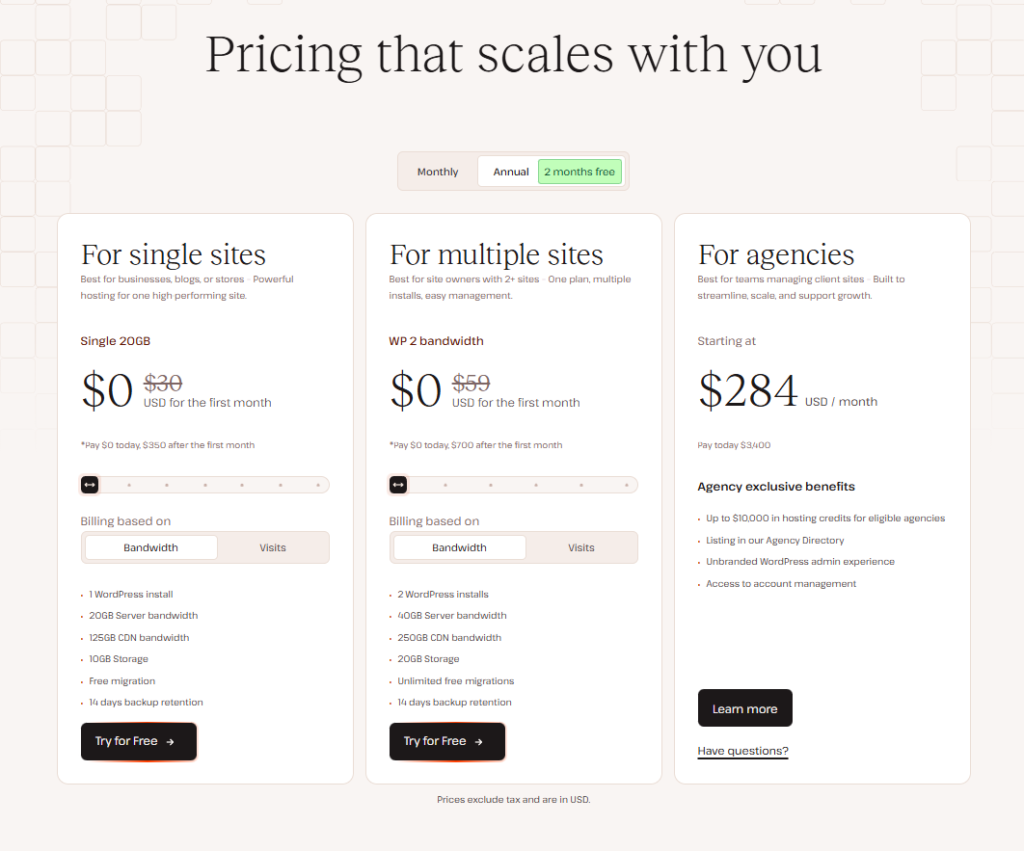
Kinsta offers three main pricing tiers designed for different needs.
All plans include core features like automatic backups, free CDN, SSL certificates, staging environments, and 24/7 support. The difference lies in the number of sites, storage, and bandwidth limits.
Pricing Overview
| Plan | Best For | Key Inclusions | Value Summary |
|---|---|---|---|
| Single Site | One high-performing WordPress site | 1 install, 20GB storage, 20GB bandwidth, free migration | Perfect for bloggers and small businesses focusing on one website |
| Multiple Sites | Site owners managing 2+ WordPress sites | 2 installs, 40GB storage, 250GB bandwidth, unlimited migrations | Ideal for entrepreneurs running multiple projects or small agencies |
| Agency Plans | Teams managing many client sites | Starting at 10+ installs, scalable resources, account management tools | Built for agencies needing centralized billing and client management |
Current Promotion
Kinsta currently offers 2 months free when you choose annual billing instead of monthly payments.
This promotion applies to all plans and can save hundreds of dollars per year for growing sites.
Free Trial and Money-Back Guarantee
While Kinsta doesn’t offer a traditional free trial, they do provide a 30-day money-back guarantee on all plans.
This lets you test the platform risk-free and get a full refund if it’s not the right fit.
Who Should Choose Which Plan?
The Single Site plan works best if you’re running one serious WordPress site and care about performance and reliability.
The Multiple Sites plan makes sense if you manage a few different websites or want room to grow without upgrading immediately.
The Agency plan is designed for freelancers or teams managing client websites who need features like staging sites for each install, agency directory listing, and up to $10,000 in hosting credits for eligible partners.
Pricing can change over time, so it’s worth checking Kinsta’s pricing page directly for the most current rates and any active promotions.
Not sure which plan fits your needs?
Get started with Kinsta and use their 30-day guarantee to test the platform without risk.
Kinsta Pros and Cons
| Pros | Cons |
|---|---|
| Lightning-fast performance powered by Google Cloud infrastructure and Cloudflare CDN ensures your site loads in under 2 seconds globally | Premium pricing reflects enterprise-quality infrastructure, which may feel high if you’re used to budget shared hosting |
| Expert 24/7 support from actual WordPress specialists who solve problems quickly instead of reading from scripts | WordPress-only focus means you can’t host non-WordPress sites, limiting flexibility if you need other platforms |
| Automatic daily backups with 14-day retention plus free hack fixes give you complete peace of mind about data security | Visitor-based overages on lower-tier plans can add extra costs during unexpected traffic spikes, though support helps you optimize |
| Free migrations and staging sites make it easy to test changes safely and switch from your current host without downtime | Learning curve for beginners who’ve only used cPanel might need time to adjust to Kinsta’s custom dashboard, though it’s more intuitive once familiar |
| Included premium features like CDN, SSL, malware scanning, and DDoS protection eliminate the need for separate paid services | No email hosting means you’ll need a separate email provider, though this actually improves performance by separating email from web hosting |
How Kinsta Compares to Alternatives
Kinsta vs WP Engine
WP Engine is Kinsta’s closest competitor in the managed WordPress hosting space.
Both offer premium performance, strong security, and expert support. The main difference is infrastructure: WP Engine uses a mix of cloud providers, while Kinsta runs exclusively on Google Cloud Platform.
Kinsta is the better choice if: you want faster global speeds through Google’s network, prefer a cleaner dashboard, or need more transparent pricing without hidden fees.
WP Engine is better if: you specifically want their proprietary caching solution or need support for legacy PHP versions.
Try Kinsta risk-free today: Try Kinsta risk-free today
Kinsta vs SiteGround
SiteGround offers managed WordPress hosting at a lower price point than Kinsta.
They provide good performance and customer support, especially for small to medium sites. However, SiteGround’s renewal prices increase significantly after the first year, and performance can slow down on shared resources.
Kinsta is the better choice if: your site gets consistent traffic, you need guaranteed resources, or you can’t afford slowdowns during traffic spikes.
SiteGround is better if: you’re just starting out with minimal traffic and need the absolute lowest entry price.
Try Kinsta risk-free today: Try Kinsta risk-free today
Kinsta vs Cloudways
Cloudways is a managed cloud hosting platform that lets you choose from multiple cloud providers including Google Cloud, AWS, and DigitalOcean.
It’s more flexible but requires more technical knowledge to optimize properly.
Kinsta is the better choice if: you want everything configured perfectly out of the box, prefer not to manage server settings, or need WordPress-specific optimizations and support.
Cloudways is better if: you want to host non-WordPress applications, need more control over server configurations, or want to choose different cloud providers for cost optimization.
Try Kinsta risk-free today: Try Kinsta risk-free today
Final Verdict: Is Kinsta Worth It?
Yes, Kinsta is absolutely worth the investment if you’re serious about your WordPress site’s performance, security, and reliability.
The premium pricing reflects premium infrastructure. You’re paying for Google Cloud’s network, expert support, automatic security, and all the technical management that would otherwise require a developer or hours of your own time.
Kinsta makes the most sense for:
- Business owners who lose money when their site goes down
- Content creators and bloggers who rely on traffic and ad revenue
- E-commerce stores where slow load times directly hurt conversions
- Agencies managing client sites who need reliable, scalable hosting
The investment pays for itself through time saved, sales protected, and headaches avoided.
If your site generates income or supports your business, the difference between budget hosting and Kinsta is the difference between worrying about your site and trusting it to just work.
Stop worrying about hosting and start growing your business.
Start your Kinsta trial today with 2 months free on annual plans. </div>
Ready to Make the Switch?
If you’ve been frustrated with slow load times, unreliable uptime, or unhelpful support, Kinsta solves all three problems.
The platform is built for WordPress site owners who want professional results without needing technical expertise.
With the 30-day money-back guarantee, you can test Kinsta’s performance, speed, and support completely risk-free. If it doesn’t meet your expectations, you get a full refund—no questions asked.
Most users see noticeable improvements within days of migrating. Your site will load faster, handle more traffic, and give you one less thing to worry about.
The hardest part is just getting started. And with free migration included, Kinsta’s team handles the technical work for you.
This article may contain affiliate links, which means I may earn a commission if you choose to try Kinsta through my links, at no extra cost to you. You can read more about this in my full affiliate disclosure.
Try Kinsta risk-free today: Try Kinsta risk-free today
Frequently Asked Questions
Is Kinsta suitable for beginners?
Yes. While Kinsta is premium hosting, their dashboard is beginner-friendly and their support team helps you with any technical questions. The free migration means you don’t need technical skills to get started.
Does Kinsta offer a free trial?
Kinsta doesn’t have a traditional free trial, but they do offer a 30-day money-back guarantee. This lets you test the platform fully and get a complete refund if it’s not right for you.
Can I host multiple WordPress sites on one Kinsta plan?
Yes, but it depends on your plan. The Multiple Sites plan starts at 2 WordPress installs, while Agency plans support 10 or more sites depending on the tier you choose.
What happens if my site exceeds the bandwidth limit?
Kinsta monitors your usage and will contact you if you’re approaching limits. You can either upgrade to a higher plan or work with their team to optimize your site’s resource usage before any overages occur.
How long does it take to migrate my site to Kinsta?
Most migrations are completed within 24-48 hours. Kinsta’s expert migration team handles everything for you, including moving files, databases, and DNS configuration, so there’s zero downtime during the switch.

Try Kinsta risk-free today: Try Kinsta risk-free today

Leave a Reply