The Silent Productivity Killer No One Talks About
You know that feeling when you’re drowning in browser tabs, juggling three different AI tools, copy-pasting between apps, and still somehow missing deadlines?
Here’s the uncomfortable truth: your workflow isn’t broken—it’s just buried under friction.
Every context switch costs you 23 minutes of focus. Every manual task steals time you’ll never get back. Every scattered tool adds another layer of chaos to your day.
But what if you could orchestrate all your AI tools—ChatGPT, Claude, Gemini, and more—from a single command center? What if switching between models was as simple as clicking a button, and your entire workflow lived in one unified workspace?
That’s exactly what Emergent AI promises to deliver.
In this comprehensive guide, you’ll discover how Emergent AI transforms chaotic AI workflows into streamlined productivity machines. Whether you’re a content creator racing against deadlines, a developer building the next big thing, or a business owner trying to scale without burning out—this could be the missing piece.

What Is Emergent AI? (The Simple Explanation)

Emergent AI is a unified AI workspace that brings all your favorite AI models into one place.
Think of it as your personal AI command center.
Instead of opening separate tabs for ChatGPT, Claude, Gemini, Perplexity, and others—then losing track of conversations, context, and sanity—Emergent AI lets you access everything from a single, beautifully designed interface.
Here’s how it works:
- One subscription, multiple models: Access GPT-4, Claude, Gemini, and other premium AI models without managing separate accounts
- Unified chat interface: Switch between AI models mid-conversation with a single click
- Conversation management: Organize, search, and revisit your AI interactions with ease
- Collaborative workflows: Share conversations, build templates, and streamline team processes
The magic isn’t just having access—it’s having organized access. Your conversations are saved, searchable, and structured. No more “where did I ask Claude about that thing last week?”
Emergent AI was built for people who use AI seriously. Not as a novelty, but as a core part of their workflow.
Who Should Use Emergent AI?
Perfect For:
- Content creators who need different AI models for brainstorming, writing, editing, and SEO optimization
- Developers and engineers comparing code outputs across GPT-4, Claude, and Gemini
- Marketing teams managing campaigns, copy, and creative across multiple AI assistants
- Researchers and analysts who need to cross-reference information from different AI sources
- Business owners looking to centralize AI usage across their organization
- Freelancers managing diverse client projects requiring different AI capabilities
- Product managers iterating on ideas and documentation with AI assistance
Might Not Be Ideal For:
- Casual users who only occasionally use ChatGPT and don’t need multi-model access
- Teams with extremely limited budgets who can stick with free-tier single-model tools
- People looking for specialized AI (like image generation or code deployment) as the primary function
Top Features of Emergent AI
1. Multi-Model Access in One Place
What it is: Switch between GPT-4, Claude Sonnet, Gemini Pro, and other leading AI models without leaving your workspace.
Why it matters: Different models excel at different tasks. GPT-4 might nail creative writing, while Claude shines at analysis and technical tasks.
Real benefit: Stop paying for multiple subscriptions. Get the best AI for each specific task—writing, coding, research, brainstorming—all under one roof.
2. Conversation Threading and Organization
What it is: Every AI conversation is automatically saved, tagged, and searchable in organized folders.
Why it matters: Your AI interactions contain valuable insights, ideas, and solutions. Losing them is like burning money.
Real benefit: Instantly find that brilliant blog outline from three weeks ago or that code snippet Claude generated last month. Your AI becomes a knowledge base, not a black hole.
3. Model Comparison Mode
What it is: Ask the same question to multiple AI models simultaneously and compare their responses side-by-side.
Why it matters: Each AI has unique strengths and perspectives. Comparing outputs gives you richer, more nuanced answers.
Real benefit: Make better decisions faster. Whether you’re choosing a marketing strategy or debugging code, seeing multiple AI perspectives simultaneously saves hours of trial and error.
4. Team Collaboration Tools
What it is: Share conversations, create templates, and collaborate on AI-generated content with team members.
Why it matters: AI work shouldn’t happen in silos. Great ideas deserve to be shared, refined, and built upon collectively.
Real benefit: Your entire team benefits from every AI breakthrough. No more recreating prompts or redoing research someone else already completed.
5. Advanced Prompt Library
What it is: Save, organize, and reuse your best-performing prompts with variables and templates.
Why it matters: Crafting the perfect prompt takes time. Once you nail it, you shouldn’t have to reinvent the wheel.
Real benefit: Turn one-time wins into repeatable processes. Your content creation, analysis, or brainstorming becomes predictable and scalable.
6. Usage Analytics and Insights
What it is: Track which models you use most, monitor conversation history, and understand your AI consumption patterns.
Why it matters: You can’t optimize what you don’t measure. Knowing your usage helps you work smarter.
Real benefit: Identify bottlenecks, discover which AI models deliver the best ROI for your use cases, and justify AI investment to stakeholders with data.
7. Priority Access and Faster Response Times
What it is: Skip the queue during peak hours when AI services get overloaded.
Why it matters: When ChatGPT or Claude is at capacity, you’re not stuck waiting. Your workflow doesn’t pause for server issues.
Real benefit: Meet deadlines consistently. When everyone else is locked out, you’re still producing.
How Emergent AI Helps (Real-World Benefits)
Let’s cut through the features and talk about what actually changes in your day-to-day work.
Time-Saving That Actually Adds Up
Instead of logging into four different platforms, remembering four different passwords, and managing four separate conversation histories—you have one hub. That saves 15-30 minutes daily. Over a month, that’s 10+ hours back in your life.
Cost Efficiency Without Compromise
Individual subscriptions to GPT-4, Claude Pro, and Gemini Advanced could cost $60-80/month separately. Emergent AI consolidates this into a single, more affordable plan while giving you additional features like organization and collaboration.
Productivity Through Smart Organization
How many times have you recreated work because you couldn’t find it? With searchable conversation history and prompt libraries, every interaction becomes a reusable asset. Your productivity compounds over time instead of resetting every Monday.
Better Outputs Through Model Diversity
Different problems need different thinking. Emergent AI lets you bounce ideas between Claude’s analytical mind and GPT-4’s creative flair without the friction. You get better results because you’re using the right tool for the job—every time.
Scalability for Teams
Solo, you’re productive. With a team using shared prompts, collaborative conversations, and centralized knowledge—you’re unstoppable. Emergent AI turns individual AI power into collective intelligence.
Real Use Cases: What You Can Actually Build
Use Case 1: Content Creator’s Complete Workflow
Before: Sarah, a freelance content writer, juggled ChatGPT for ideation, Claude for research, and Grammarly for editing. She constantly lost track of outlines, spent 20 minutes searching old conversations, and wasted money on three subscriptions.
After: With Emergent AI, Sarah now:
- Brainstorms blog topics using GPT-4’s creativity
- Switches to Claude for in-depth research and factual accuracy
- Compares headline options across models to find the winner
- Saves all conversations in organized project folders
- Reuses her best-performing prompts with saved templates
Result: Sarah cut content production time by 40%, reduced subscription costs by $35/month, and delivers higher-quality work consistently. Her client retention skyrocketed.
Use Case 2: Developer Debugging and Code Review
Before: Marcus, a backend developer, used ChatGPT for code generation but found Claude better for debugging complex logic. Switching platforms meant losing context, copy-pasting code repeatedly, and fragmenting his problem-solving flow.
After: With Emergent AI, Marcus:
- Asks GPT-4 to generate initial code structures
- Switches to Claude mid-conversation for debugging without losing context
- Compares both models’ approaches to solving architecture challenges
- Saves complex debugging prompts for future reference
- Shares solutions with his development team instantly
Result: Marcus reduced debugging time by 50%, improved code quality through multi-model validation, and created a team knowledge base of proven solutions.
Use Case 3: Marketing Team Campaign Development
Before: The marketing team at a mid-sized SaaS company used different AI tools for copywriting, SEO, email campaigns, and social media. Collaboration was messy, prompts were reinvented weekly, and consistency suffered.
After: With Emergent AI, the team:
- Created shared prompt templates for brand voice across all channels
- Collaborated on campaign messaging in real-time
- Used model comparison to A/B test headline variations before publishing
- Organized all campaign conversations in dedicated folders
- Tracked which AI models worked best for different content types
Result: Campaign production speed doubled, brand consistency improved across channels, and the team reduced AI tool costs by 60% while increasing output quality.
Use Case 4: Business Analyst Competitive Research
Before: Jennifer, a business analyst, spent hours gathering market insights from various AI tools, manually consolidating outputs, and losing valuable analysis when conversations disappeared.
After: With Emergent AI, Jennifer:
- Runs the same research question across multiple AI models simultaneously
- Compares perspectives to identify blind spots and validate insights
- Saves all research conversations in client-specific folders
- Builds a library of reusable analysis prompts
- References past research instantly when preparing reports
Result: Jennifer delivers more comprehensive reports in half the time, provides clients with multi-perspective analysis, and builds on previous research instead of starting from scratch.
Use Case 5: Educator Creating Course Materials
Before: Dr. Patel created online courses using AI to generate quizzes, explanations, and study guides—but managing content across platforms was chaotic, and ensuring accuracy required constant verification.
After: With Emergent AI, Dr. Patel:
- Uses Claude for technical accuracy in course explanations
- Switches to GPT-4 for creative examples and engaging storytelling
- Compares model outputs to ensure comprehensive coverage
- Organizes all course materials by module in dedicated folders
- Shares prompt templates with teaching assistants for consistency
Result: Course creation time reduced by 35%, content quality improved with multi-model validation, and the entire teaching team now works from the same AI playbook.
Pricing & Plans
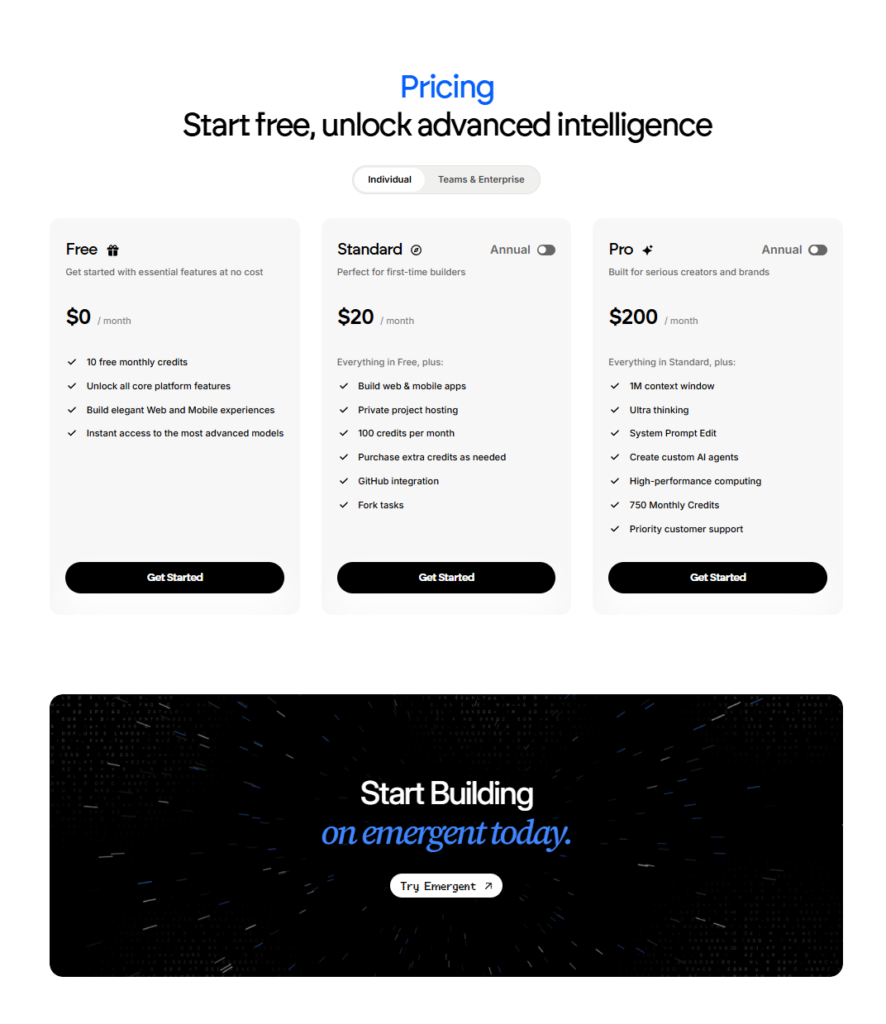
Emergent AI offers flexible plans designed for individuals and creators at every stage, from exploring ideas to building production-ready AI applications.
Free Plan — $0 per month
Get started with essential features at no cost.
Includes 10 free monthly credits, access to all core platform features, the ability to build elegant web and mobile experiences, and instant access to advanced AI models.
Best for beginners, students, and curious builders who want to explore Emergent AI without committing.
Standard Plan — $20 per month
Designed for first-time builders ready to ship real projects.
Includes everything in the Free plan plus the ability to build full web and mobile apps, private project hosting, 100 credits per month, the option to purchase additional credits, GitHub integration, and task forking for faster iteration.
Best for solo developers, indie hackers, and creators building and deploying applications.
Pro Plan — $200 per month
Built for serious creators and brands that require maximum performance.
Includes everything in the Standard plan plus a 1M token context window, ultra-thinking mode, system prompt editing, custom AI agents, high-performance computing, 750 monthly credits, and priority customer support.
Best for startups, advanced developers, AI product teams, and businesses running large or complex AI workloads.
Start free and scale as you grow. Emergent AI lets you move from idea to production without switching tools.
PROS:
✅ Unified Multi-Model Access: Stop juggling subscriptions and browser tabs. Access GPT-4, Claude, Gemini, and more from one dashboard—saving both money and mental energy.
✅ Superior Organization: Every conversation is automatically saved, searchable, and organized. Your AI interactions become a knowledge base instead of disappearing into the void.
✅ Model Comparison Feature: Ask multiple AI models the same question simultaneously and compare responses side-by-side. Get richer insights and make better decisions faster.
✅ Collaboration-Friendly: Share conversations, templates, and prompts with team members. Turn individual AI insights into collective intelligence.
✅ Cost-Effective Consolidation: Pay one subscription instead of three or four separate AI tool costs. ROI becomes clear within the first month.
✅ Time-Saving Workflow Integration: Switching between models is instant. No more logging in, out, and back in. Your flow stays uninterrupted.
✅ Reusable Prompt Library: Save your best prompts and turn one-time wins into repeatable processes. Scale quality output without scaling effort.
✅ Priority Access During Peak Times: When ChatGPT or Claude gets overloaded, you’re not stuck waiting. Meet deadlines even when the internet is melting down.
CONS:
⚠️ Because Emergent AI focuses on consolidating multiple premium AI models, it may not be ideal for ultra-budget-conscious users who are perfectly happy using only free-tier versions of individual AI tools.
⚠️ Because Emergent AI prioritizes conversational AI and text-based workflows, it may not be the best choice for users primarily seeking advanced image generation, video editing, or other specialized AI functions beyond text and code.
⚠️ Because Emergent AI is optimized for professionals and teams with consistent AI usage, casual users who only need AI occasionally might find a single free ChatGPT account sufficient for their needs.
Emergent AI vs Alternatives (When It’s the Right Choice)
Let’s be real—you have options. Here’s how Emergent AI stacks up against other approaches:
Emergent AI vs. Individual AI Subscriptions (ChatGPT Plus + Claude Pro + Gemini Advanced)
Individual Subscriptions:
- Access to each model separately
- Total cost: $60-80/month
- Fragmented conversation history
- No cross-model comparison
- Manual organization required
Emergent AI:
- All models in one place
- Single, lower-cost subscription
- Unified conversation management
- Built-in model comparison
- Automatic organization and search
When Emergent AI wins: If you’re already using or planning to use multiple AI models, Emergent AI saves money and massively reduces friction.
Emergent AI vs. Poe (Quora’s Multi-Model Platform)
Poe:
- Multi-model access
- Free tier with limitations
- Basic conversation threading
- Simpler interface
- Limited collaboration features
Emergent AI:
- Professional-grade organization
- Advanced prompt libraries
- Team collaboration tools
- Priority access and support
- Deeper usage analytics
When Emergent AI wins: If you’re a professional or team that needs serious organization, collaboration, and reliability—not just casual multi-model access.
Emergent AI vs. Using Free AI Tools Only
Free Tools:
- Zero upfront cost
- Limited features and models
- Rate limits and restrictions
- No organization or history
- Ads or usage caps
Emergent AI:
- Premium model access
- Unlimited usage
- Professional organization
- Conversation history and search
- Time-saving automation
When Emergent AI wins: If your time is valuable and AI is a core part of your workflow. The productivity gains pay for the subscription within days.
How to Get Started With Emergent AI (Step-by-Step)
Getting up and running with Emergent AI takes less than 10 minutes. Here’s exactly how to do it:
Step 1: Visit the Official Website
Head over to Emergent AI’s platform and click the “Get Started” or “Sign Up” button. You’ll see the available plans—choose the one that fits your needs (Pro is most popular).
Step 2: Create Your Account
Sign up using your email or Google/GitHub account. The process is quick—no long forms, no unnecessary questions. Verify your email if required.
Step 3: Initial Setup and Workspace Configuration
Once you’re in, you’ll land on your dashboard. Take 2 minutes to:
- Set your preferred default AI model (you can always switch later)
- Create your first project or conversation folder
- Explore the model switcher in the top navigation
- Check out the prompt library if pre-built templates are available
Step 4: Your First Successful Action
Start simple:
- Open a new conversation
- Ask a question like “Give me 5 blog post ideas about remote work productivity”
- Notice the model selector (GPT-4, Claude, Gemini, etc.)
- Switch to a different model mid-conversation and ask it to expand on one idea
- Compare the responses
Boom. You’ve just experienced the core value proposition.
Step 5: Optimization Tips for Long-Term Success
To get the most out of Emergent AI from day one:
- Organize conversations into folders by project or topic. Future you will thank present you.
- Save your best prompts in the prompt library immediately. Start building your personal AI toolkit.
- Use model comparison mode for important decisions or creative work. Two perspectives beat one.
- Explore keyboard shortcuts if available—speed up your workflow once you’re comfortable.
- Set up team workspaces if you have collaborators. Don’t wait until chaos hits.
That’s it. You’re now leveraging multiple AI models smarter than 99% of people.
Final Verdict: Is Emergent AI Worth It?
Let’s cut to the chase.
Emergent AI is absolutely worth it if:
- You’re already using or planning to use multiple AI models (GPT-4, Claude, Gemini)
- You value organization and hate losing valuable AI conversations
- Your time is worth more than manually juggling platforms and subscriptions
- You’re part of a team that needs to collaborate on AI-generated content
- You want better outputs through model comparison and diversity
- You’re serious about integrating AI into your professional workflow
You can probably skip it if:
- You only occasionally use AI and are happy with free ChatGPT
- You’re on an extremely tight budget and can’t justify any monthly tools
- You don’t mind fragmented workflows and lost conversation history
For everyone else—content creators, developers, marketers, business owners, researchers—Emergent AI delivers immediate ROI. The time saved in the first week typically pays for the first month.
The real question isn’t “Is it worth it?” but rather “Can I afford not to streamline this part of my workflow?”
If AI is already central to how you work, Emergent AI is the command center you didn’t know you needed.
Ready to Take Control of Your AI Workflow?
You’ve seen what’s possible. You understand the value. Now it’s time to experience it yourself.
Start your free trial with Emergent AI today and see how much faster, easier, and more organized your AI workflow becomes.
No long-term commitment. No risk. Just results.
Thousands of professionals have already made the switch. The only question left is: will you join them, or will you keep juggling tabs and losing conversations?
Click here to get started with Emergent AI now → https://app.emergent.sh/?via=solstle-affiliate
Your future, more productive self will thank you.

Frequently Asked Questions (FAQs)
1. Can I try Emergent AI for free before committing?
Yes. Emergent AI typically offers a free trial or a free tier so you can test the platform, explore the features, and see if it fits your workflow before subscribing to a paid plan.
2. Which AI models does Emergent AI support?
Emergent AI provides access to leading AI models including GPT-4 (OpenAI), Claude (Anthropic), Gemini (Google), and others. The exact lineup may expand over time, but all major conversational AI models are included.
3. Can I share my AI conversations with team members?
Absolutely. Emergent AI includes collaboration features that let you share conversations, create shared workspaces, and build team-wide prompt libraries—especially useful for agencies, marketing teams, and development squads.
4. Is my data private and secure on Emergent AI?
Yes. Emergent AI follows industry-standard security practices to protect your conversations and data. Always review the privacy policy on their official site for the most current details on data handling and compliance.
5. How does Emergent AI save me money compared to individual AI subscriptions?
If you subscribe to ChatGPT Plus ($20/month), Claude Pro ($20/month), and Gemini Advanced ($20/month) separately, you’re paying $60/month. Emergent AI consolidates access to all these models under one subscription at a lower total cost—plus you get organization, search, and collaboration features those platforms don’t offer individually.
6. Can I switch between AI models mid-conversation?
Yes, that’s one of Emergent AI’s standout features. You can start a conversation with GPT-4, then seamlessly switch to Claude or Gemini without losing context or having to copy-paste between platforms.
7. What happens to my conversations if I cancel my subscription?
Policies vary, so check Emergent AI’s terms. Typically, you’ll lose access to premium features and model access, but you may retain read-only access to your saved conversations for a period. Always export important content before canceling if you’re concerned.
You’ve made it to the end. Now it’s decision time.
Will you keep juggling platforms, losing conversations, and paying for multiple subscriptions?
Or will you consolidate, organize, and supercharge your AI workflow with Emergent AI?
The choice is yours. Click here to get started →

Leave a Reply