A new automation tool recently exploded across the internet, promising to let artificial intelligence take over your repetitive computer tasks. Originally called Clawdbot (now renamed to Moltbot after legal pressure), this application connects messaging apps, AI models, and your computer’s file system to create what some are calling revolutionary automation.
But is it actually groundbreaking, or just repackaged technology with a viral marketing strategy?
In this guide, you’ll learn exactly how this tool functions, the serious risks you need to understand before trying it, and whether it lives up to the hype. You’ll also discover safer alternatives that might work better for your specific needs.
If you’ve been curious about AI-powered computer automation but aren’t sure where to start, this breakdown will help you make an informed decision.
What Is Clawdbot (Moltbot)?
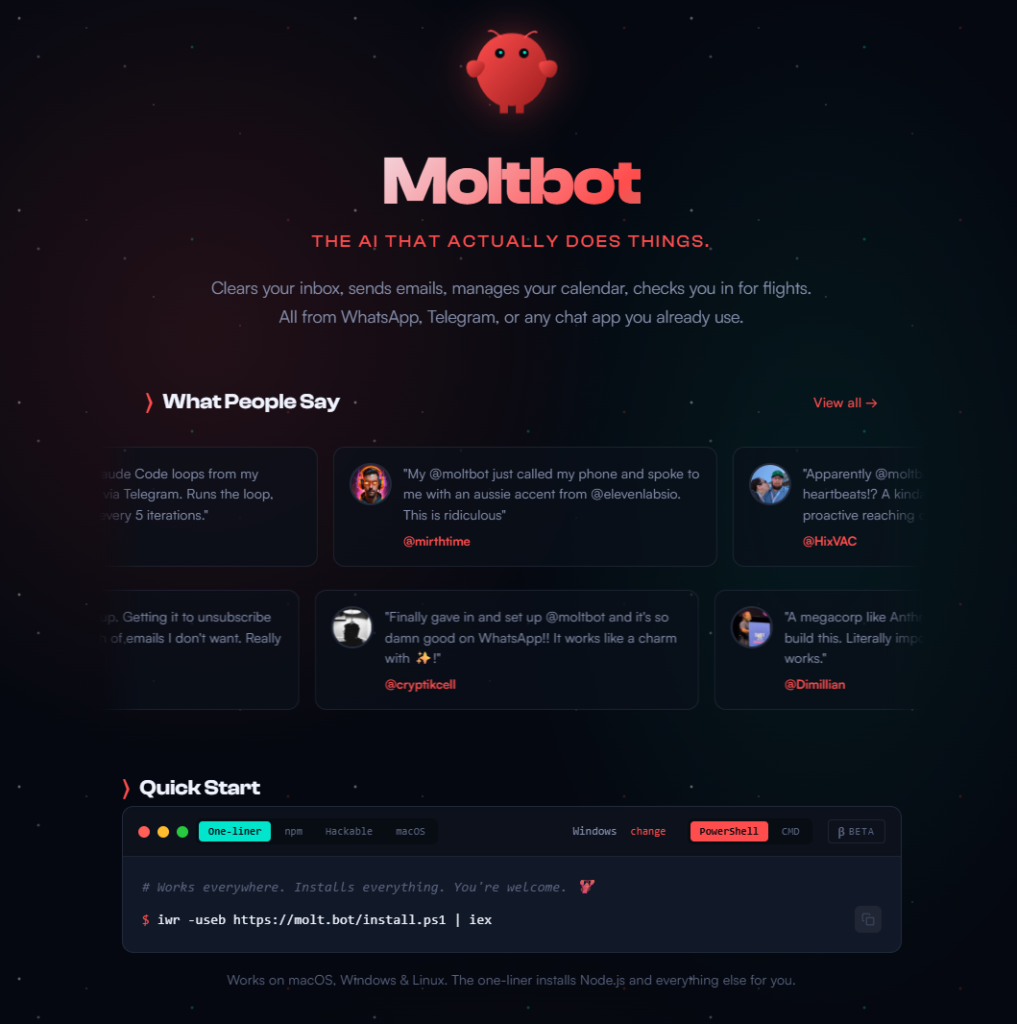
Clawdbot is an automation tool that lets you send instructions through messaging apps like WhatsApp or Telegram, which then trigger AI to control your computer and complete tasks automatically.
Despite the name, this tool has zero connection to Anthropic or Claude AI. The creator chose that name intentionally to ride the popularity wave of one of the most recognizable AI brands. After Anthropic requested a rebrand, the tool became “Moltbot” — though many people still refer to it by its original viral name.
The core concept: instead of manually clicking through folders, typing emails, or organizing files yourself, you describe what you want done, and the AI attempts to execute it using your computer’s applications and files.
What It Does
This assistant is designed to live where you already work—on your machine, in your chats, and across your tools—while staying private, powerful, and deeply personal.
Runs on Your Machine
It works natively on macOS, Windows, and Linux, and supports models from Anthropic, OpenAI, or fully local setups. Your data stays on your system by default, giving you privacy without sacrificing capability.
Works in Any Chat App
You can talk to it wherever you already communicate—WhatsApp, Telegram, Discord, Slack, Signal, or iMessage. It functions seamlessly in direct messages and group chats, so help is always just a message away.
Persistent Memory
It remembers you. Your preferences, your context, your patterns. Over time, it becomes uniquely yours—an assistant that adapts instead of starting from scratch every conversation.
Browser Control
It can browse the web, fill out forms, and extract structured data from virtually any website. Think of it as hands-on help, not just answers.
Full System Access
With your permission, it can read and write files, run shell commands, and execute scripts. You decide whether it has full access or operates in a sandboxed environment.
Skills & Plugins
Its abilities don’t stop out of the box. Extend it with community-built skills or create your own. It can even write new skills itself, evolving alongside your needs.
Works With Everything
One of the biggest advantages of this assistant is how effortlessly it fits into your existing workflow. You don’t need to change where you work—it simply shows up there.
It integrates with all major messaging platforms, including WhatsApp, Telegram, Discord, Slack, Signal, and iMessage, allowing you to interact with it just like you would with a real teammate. Whether you’re in private conversations or group chats, it’s always available.
Beyond chat apps, it connects deeply with the tools you already use every day. From AI models like GPT and Claude, to productivity and creativity platforms like Obsidian, Spotify, and Hue, to developer and web tools such as GitHub, Gmail, browsers, and social platforms, everything works together in one seamless system.

With 50+ integrations and counting, the ecosystem keeps growing—powered by both the community and your own custom extensions. You can explore what’s already available or see what others have built to get inspired.
No silos. No switching tabs. Just one assistant that works everywhere you do.
Featured In
The project has already caught the attention of leading voices in the tech and developer community, earning recognition for its vision of personal, locally-run AI.
MacStories highlighted the assistant as a glimpse into what’s next for personal AI, calling it a compelling example of how assistants can move beyond the cloud and become truly personal.
“[Product] showed me what the future of personal AI assistants looks like.”
— Federico Viticci
StarryHope explored the growing trend of developers running their own AI agents, pointing to this project as a key reason many are investing in dedicated hardware to power local intelligence.
“The Lobster Takeover: Why Developers Are Buying Mac Minis to Run Their Own AI Agents.”
— Jim Mendenhall
How Clawdbot Actually Works (3 Simple Layers)
Understanding this tool becomes easier when you break it down into three connected layers:
Layer 1: The Messaging Interface
You communicate with the system through platforms you already use daily. Supported options include:
- Telegram
- SMS text messages
You send a message describing your task, and responses come back through the same channel once the AI completes (or attempts) your request.
Layer 2: The AI Brain
The system needs intelligence to interpret your instructions and decide what actions to take. You connect it to one of these AI models:
- ChatGPT (OpenAI)
- Claude (Anthropic)
- Google Gemini
This AI layer reads your message, figures out the steps needed, and determines which files or applications to access.
Layer 3: The Computer Control
This is where things get powerful and potentially risky. The tool gains permission to control your computer directly, including:
- Opening and closing applications
- Reading and editing files
- Creating or deleting folders
- Sending emails
- Downloading content from the internet
Think of it as giving the AI “hands” to perform physical actions on your behalf.
When you combine all three layers, you get a system where you text “Create a weekly newsletter in Google Docs about productivity tips,” and the AI attempts to research content, write the document, and save it to your drive — all without you touching your keyboard.
Major Risks You Must Understand
Before getting excited about automating everything, you need to know the serious downsides that come with this approach.
Risk #1: No Built-In Safety Rails
Traditional software gives you confirmation prompts. When you try deleting an important folder, your computer asks “Are you sure?”
With Clawdbot, the AI makes decisions independently based on what it thinks you want. There’s no pause button or confirmation screen. If the AI misinterprets your instruction, it executes anyway.
You’ve probably noticed this unpredictability when using ChatGPT — ask the same question twice, get two different answers. Now imagine that inconsistency controlling your actual files and applications.
Risk #2: Broad File and Folder Access
You must grant extensive permissions for the tool to function. This means the AI can:
- Access any document on your computer
- Modify or delete files without warning
- Download software or files you didn’t explicitly request
- Send emails using your account
- Make purchases if connected to accounts with payment methods
Once you give these permissions, the AI operates with the same level of access you have. There’s no built-in boundary between “safe to touch” and “critical business files.”
Risk #3: Unpredictable Costs
Most AI models charge per use through API connections. If you set up daily or weekly automated tasks, costs accumulate quickly.
The problem: you might not realize how expensive your automation became until you check your billing at month’s end. Each time the AI runs, it consumes API credits from ChatGPT, Claude, or Gemini — and those charges add up faster than expected when automation runs continuously.
Is Clawdbot Actually Revolutionary? (The Honest Truth)
Many videos and posts claim this tool will “change everything” or represents a massive breakthrough. That’s misleading.
The reality: automation tools with similar capabilities already exist, and some work more reliably.
Existing Alternatives That Do the Same Thing
No-Code Automation Platforms (Deterministic):
- n8n (free and open-source)
- Make.com (formerly Integromat)
- Zapier
These platforms let you build workflows that connect apps and automate processes. The key difference? They’re deterministic, meaning you design each step explicitly, and the same input always produces the same output.
AI-Powered Alternatives:
- Claude Code (for developers automating coding tasks)
- Relevance AI (AI workflows with built-in guardrails)
Deterministic vs. Probabilistic: Why This Matters
| Feature | Deterministic Automation (e.g., n8n, Make) | Probabilistic Automation (e.g., Clawdbot) |
|---|---|---|
| How it works | You define each step explicitly | You define a goal; AI decides the steps |
| Consistency | Same input produces the same output every time | Results can vary between runs |
| Reliability | Very high | Medium to low |
| Flexibility | Limited to predefined logic | Highly flexible and adaptive |
| Predictability | Fully predictable | Inherently unpredictable |
| Error risk | Low and easy to trace | Higher and harder to diagnose |
| Best for | Business workflows, scheduled tasks, compliance | Creative tasks, exploratory automation |
| Example use case | Sending a newsletter every Monday at 9 AM | Researching and drafting content on new topics |
| Control over actions | Full human control | AI-driven decision making |
| Risk level | Low | High when combined with system access |
Deterministic tools (like n8n or Make):
- You build each automation step manually
- Results stay consistent every time
- Predictable and reliable for business operations
Probabilistic tools (like Clawdbot):
- You define a goal; AI figures out the steps
- Results vary each time it runs
- More flexible but less reliable
When you need your newsletter sent every Monday at 9 AM with consistent formatting, deterministic wins. When you want AI to creatively solve unique problems that change frequently, probabilistic has advantages.
The challenge with Clawdbot: it combines probabilistic AI with unrestricted computer access, creating unpredictability in scenarios where you usually need reliability.
How to Try Clawdbot for Free (Step-by-Step)
If you still want to experiment despite the risks, here’s how to get started:
Option 1: Run It on Your Computer (Free)
Step 1: Visit claw.bot (note: the domain name hasn’t been updated to reflect the Moltbot rebrand)
Step 2: Navigate to the “Quick Start Guide” section
Step 3: Click the copy button to grab the installation command
Step 4: Open your computer’s terminal:
- Mac users: Press Command + Space, type “Terminal,” and hit Enter
- Windows users: Search for “Command Prompt” or “PowerShell” in the Start menu
Step 5: Paste the copied command into your terminal and press Enter
Step 6: Follow the setup prompts to connect your messaging app and AI model
The entire process takes just a few minutes, and you don’t need any coding knowledge.
Option 2: Cloud Hosting with Hostinger (Starting at $4.99/month)
Running Clawdbot on your personal computer has limitations. If your internet disconnects, your computer goes to sleep, or you shut it down, all automation stops.
Cloud hosting solves this by running the tool on remote servers that stay active 24/7. Hostinger offers dedicated Clawdbot hosting starting at $4.99 monthly.
When cloud hosting makes sense:
- You need automation to run while you’re away from your computer
- You’re automating critical business processes
- You want reliable uptime without worrying about local technical issues
When local installation works fine:
- You’re just testing the tool
- You only need automation while actively working
- Budget is extremely tight
Cloud Hosting with Hostinger
The Mac Mini Option (Not Recommended for Most People)
Some enthusiasts purchase Mac Mini computers ($600-$1,400) specifically to host Clawdbot and run it constantly.
Unless you’re running a business that generates significant revenue from automation, this investment doesn’t make practical sense. Cloud hosting at $5-$10 monthly gives you the same always-on capability without the upfront hardware cost.
Common Mistakes to Avoid
Mistake #1: Granting Permissions Without Understanding Them
Before giving Clawdbot access to your files, create a separate user account on your computer with limited permissions. Test the tool there first before connecting it to your main account with important documents.
Mistake #2: Running Business-Critical Tasks Without Backups
If you’re automating anything important, maintain manual backups of your files and databases. When AI makes an unexpected decision, you need the ability to restore previous versions.
Mistake #3: Not Monitoring API Costs
Set up billing alerts in ChatGPT, Claude, or whichever AI model you connect. Configure notifications when spending exceeds certain thresholds so you catch runaway costs early.
Mistake #4: Expecting Perfect Results Immediately
AI automation requires testing and refinement. Your first attempts will likely produce errors or unexpected outputs. Start with simple, low-stakes tasks and gradually increase complexity as you learn how the system interprets your instructions.
Mistake #5: Automating Tasks You Don’t Understand Manually
If you can’t complete a task manually, don’t try automating it with AI yet. Understanding the process yourself helps you write better instructions and catch AI mistakes more easily.
Tracking & Improvement
Even when automation runs smoothly, you need systems to measure whether it’s actually saving time and delivering value.
Use Google Search Console if you’re automating content creation or SEO tasks. Track whether AI-generated content ranks well and drives organic traffic to your site.
Use Google Analytics to monitor user behavior on automated content. Check metrics like:
- Time on page
- Bounce rate
- Conversion rates
If automated content performs worse than manually created content, that’s feedback to adjust your approach.
Create a simple spreadsheet tracking:
- Time spent setting up automation vs. time saved weekly
- Cost of API usage vs. value of completed tasks
- Error rate and time spent fixing AI mistakes
This data helps you decide which tasks benefit from automation and which still need human oversight.
FAQ
Q: Do I need coding experience to use Clawdbot?
No coding knowledge is required for basic setup. You copy a command into your terminal and follow prompts. However, troubleshooting issues may require some technical comfort.
Q: Is Clawdbot safe for business use?
Currently, no. The lack of guardrails and unpredictable results make it risky for mission-critical operations. Stick with deterministic automation tools like n8n or Make.com for business processes that must run reliably.
Q: Can Clawdbot accidentally delete important files?
Yes. If the AI misinterprets your instruction or makes an incorrect decision, it could delete files without confirmation prompts. Always maintain backups and test with non-critical files first.
Q: How much does running Clawdbot actually cost?
The software itself is free, but you pay for AI API usage (ChatGPT, Claude, or Gemini) and potentially hosting. Costs vary dramatically based on how frequently automation runs and which AI model you use. Start with tight budget limits.
Q: What’s the difference between Clawdbot and tools like Zapier?
Zapier and similar platforms use deterministic logic (if X happens, always do Y). Clawdbot uses probabilistic AI (interpret this goal and figure out how to achieve it). Zapier delivers consistent results; Clawdbot offers flexibility but less reliability.
Q: Will Clawdbot work on Windows computers?
Yes, though setup instructions may vary slightly. The terminal commands work across Mac, Windows, and Linux systems.
Q: Can I limit what files Clawdbot can access?
You can create a restricted user account on your computer with access only to specific folders, then run Clawdbot from that account. This provides some protection for sensitive files.
Q: Is Moltbot the same as Clawdbot?
Yes. The creator renamed it to Moltbot after Anthropic requested they stop using a name similar to Claude AI. Functionality remains identical.
Conclusion
Clawdbot (now Moltbot) represents an interesting experiment in AI-powered computer automation, but it’s not the revolutionary breakthrough many viral videos claim.
The core idea — combining messaging apps, AI models, and computer control — has genuine potential for the future of automation. However, the current implementation lacks the safety features and reliability most people need for practical use.
If you’re curious about AI automation, start with lower-risk options like n8n or Make.com where you control each step explicitly. Once you understand automation principles, experimenting with Clawdbot on non-critical tasks can teach you valuable lessons about AI capabilities and limitations.
Your next step: Choose one repetitive task you perform weekly. Map out every step manually. Then decide whether deterministic automation (guaranteed consistency) or probabilistic automation (creative flexibility) better fits your needs.
Share this guide with anyone exploring AI automation tools — understanding the real capabilities and risks helps everyone make smarter technology decisions.
Tools Mentioned (Quick Breakdown)
Clawdbot (Moltbot)
What it does: Connects messaging apps to AI models that control your computer to automate tasks.
Why it matters: Represents a new approach to AI automation, though currently lacks safety features for reliable business use.
WhatsApp / Telegram / SMS
What they do: Messaging platforms that serve as the interface for sending commands to Clawdbot.
Why it matters: Lets you trigger automation from your phone using apps you already know.
ChatGPT / Claude / Google Gemini
What they do: Large language models that interpret your instructions and decide what actions to take.
Why it matters: Provides the “brain” that understands natural language requests and plans execution steps.
n8n
What it does: Free, open-source workflow automation platform with visual node-based design.
Why it matters: Offers deterministic automation that produces consistent results, making it more reliable for business operations.
Make.com (Integromat)
What it does: No-code automation platform connecting hundreds of apps through visual workflows.
Why it matters: Provides predictable automation without requiring coding skills or granting full computer access.
Hostinger
What it does: Web hosting provider offering dedicated Clawdbot hosting starting at $4.99/month.
Why it matters: Keeps automation running 24/7 even when your personal computer is off or disconnected.
Google Search Console
What it does: Free tool from Google showing how your website performs in search results.
Why it matters: Helps measure whether AI-generated content ranks well and drives organic traffic.
Google Analytics
What it does: Tracks visitor behavior on your website including time spent, bounce rates, and conversions.
Why it matters: Shows whether automated content engages users as effectively as manually created content.
Discover Powerful AI Tools Here -> AI TOOLS

Leave a Reply