You’re tired of jumping between five different tools just to get work done.
One app for documents. Another for spreadsheets. A third for project management. A fourth for forms. And somehow, nothing talks to each other.
Your team is scattered across platforms, information gets lost, and simple tasks take twice as long as they should.
Coda promises to change that by combining docs, spreadsheets, databases, and apps into one flexible workspace. But does it actually deliver, or is it just another tool that adds to the chaos?
In this Coda review, we’ll explore what makes this platform different, who benefits most from using it, and whether it’s worth your time and money.
What Is Coda?
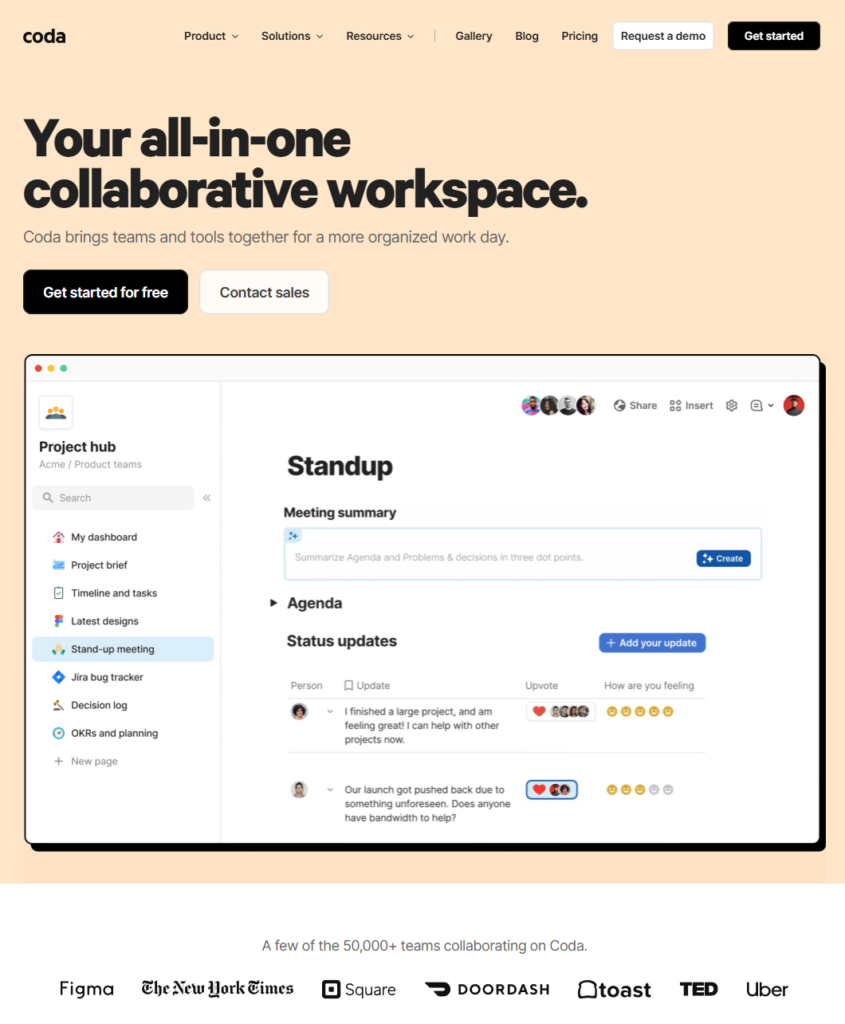
Coda is an all-in-one document platform that combines the familiarity of docs with the power of spreadsheets, databases, and applications.
Think of it as a blank canvas where you can build exactly what your team needs—whether that’s a simple meeting note, a complex project tracker, or a custom CRM.
Unlike traditional documents that just hold text, Coda docs are interactive. They can include tables that act like databases, buttons that trigger automations, forms that collect data, and charts that update in real time.
The platform was built to replace multiple tools with one flexible system. Instead of using Google Docs for writing, Airtable for databases, Trello for project management, and Zapier for automations, you can do it all inside Coda.
It’s designed for teams who want control over their workflows without needing to hire developers.
Who Should Use Coda?
Coda works best for:
- Teams who use multiple productivity tools and want to consolidate them into one platform
- Project managers who need custom workflows that standard templates don’t support
- Startups and small businesses looking for flexible, affordable collaboration tools
- Product teams who want to connect roadmaps, specs, and documentation in one place
- Operations teams who need to build custom processes, trackers, and dashboards
- Remote teams who need a single source of truth that everyone can access and update
- People comfortable with spreadsheets who want more power without learning to code
Who might not benefit as much:
If you need a simple, straightforward tool and don’t want customization options, Coda might feel overwhelming at first. Teams looking for industry-specific software (like accounting or legal tools) may need dedicated platforms instead.
Coda combines the best of docs, spreadsheets, apps, and AI in one powerful platform. Build interactive workspaces where your documents think like databases, your tables connect like apps, and your workflows automate themselves. No coding required—just the flexibility to create exactly what your team needs, all in one place.
Coda blends the flexibility of docs, structure of spreadsheets, power of applications, and intelligence of AI into one unified workspace. Unlike traditional tools that force you to choose between writing documents or building databases, Coda lets you do both—seamlessly. Create interactive docs that think like apps, with connected tables that update in real time, customizable views that adapt to your workflow, and smart automations that handle repetitive tasks. Whether you’re managing projects, tracking roadmaps, or collaborating with your team, Coda gives you the building blocks to design exactly what you need without writing a single line of code. It’s not just a document. It’s not just a spreadsheet. It’s your team’s central nervous system—where planning, execution, and collaboration happen in one place.
Top Features of Coda
1. Connected Tables and Databases
Coda tables aren’t just static grids. They’re databases that can connect to each other, just like a real database system.
You can create a table of clients, link it to a table of projects, and automatically pull information between them.
Why it matters: You build once and reuse data everywhere. No more copying and pasting between sheets or losing track of updates.
2. Powerful Formulas and Automations
Coda includes a formula language that goes beyond basic spreadsheet functions.
You can automate repetitive tasks, send notifications, update records, and trigger actions with buttons—all without writing code.
Why it matters: You save hours every week on manual work and reduce human error in processes.
3. Interactive Buttons and Packs
Add buttons to your docs that perform actions when clicked—like sending an email, creating a task, or updating a status.
Packs connect Coda to external tools like Gmail, Slack, Google Calendar, Jira, and GitHub so data flows both ways.
Why it matters: Your doc becomes a control center where you can take action, not just read information.
4. Custom Views and Layouts
Display the same data in multiple formats: as a table, kanban board, calendar, timeline, or card view.
You can create different views for different team members so everyone sees what’s relevant to them.
Why it matters: You adapt the tool to how your team works, rather than forcing everyone to work the same way.
5. Real-Time Collaboration
Multiple people can edit the same doc simultaneously, with changes appearing instantly.
You can comment, tag teammates, assign tasks, and track who made what changes.
Why it matters: Teams stay aligned without endless email threads or version control nightmares.
6. Templates and Pre-Built Solutions
Coda offers a library of templates for common use cases: meeting notes, OKRs, sprint planning, hiring pipelines, product roadmaps, and more.
You can start with a template and customize it, or build from scratch.
Why it matters: You get productive fast without reinventing solutions that already exist.
7. Version History and Doc Locking
Every change is saved automatically with unlimited version history on paid plans.
You can restore previous versions, see who made changes, and lock docs to prevent accidental edits.
Why it matters: You never lose work, and you can confidently collaborate knowing there’s a safety net.
Ready to simplify your workflow?
Try Coda for free and see how it replaces multiple tools with one flexible platform. </div>
Benefits of Using Coda
Consolidate Your Tool Stack
Instead of paying for five different subscriptions, Coda combines docs, databases, project management, and automations in one place.
You reduce software costs, eliminate data silos, and give your team one place to work.
Save Time on Repetitive Tasks
Automations and formulas handle the boring stuff—sending reminders, updating statuses, calculating totals, generating reports.
Your team spends less time on busywork and more time on work that matters.
Customize Without Coding
You don’t need developers to build what you need. Coda’s building blocks—tables, buttons, formulas, and packs—let non-technical users create powerful workflows.
You adapt faster to changing needs without waiting on IT or vendors.
Improve Team Alignment
When everything lives in one doc that updates in real time, everyone works from the same information.
Miscommunication drops. Decisions happen faster. Projects move forward smoother.
Scale as You Grow
Start with simple docs and add complexity as your needs grow. Coda scales from solo users to enterprise teams with advanced permissions, integrations, and security.
You invest in a tool that grows with you, not one you’ll outgrow in six months.
If you’re ready to experience these benefits firsthand, explore Coda today and start with their free plan.
Real-World Use Case: How a Marketing Team Streamlined Campaign Management
A mid-sized marketing agency was drowning in chaos.
Before Coda: Campaign briefs lived in Google Docs. Task lists were in Trello. Budget tracking happened in Excel. Client feedback came through email. Assets were scattered across Dropbox folders.
Every campaign required jumping between six tools. Team members constantly asked, “Where’s the latest version?” or “Did this get approved?”
Deadlines were missed because someone didn’t see an update. Budget overruns happened because spreadsheets weren’t shared.
After Coda: They built a single Campaign Hub doc.
It included a connected database of campaigns, clients, deliverables, and budgets. Each campaign had its own page with a brief, timeline, task board, asset library, and approval workflow.
When a designer uploaded a new asset, a button notified the project manager. When budget spending hit 80%, an automation sent an alert. When the client approved a deliverable, a status changed and the next task appeared.
Everything was connected. Everyone saw the same information in real time.
Result: Campaign launches became 30% faster. Budget tracking was automatic. Client approvals happened in-doc with clear version history. Team members stopped asking where things were—they just opened the Campaign Hub.
The agency saved 12 hours per week in coordination time and reduced tool subscriptions from eight to three.
Coda Pricing and Plans
Coda offers four pricing tiers designed to fit different team sizes and needs.
Free Plan
Best for: Individuals and small teams just getting started.
The Free plan includes unlimited docs, connected tables, charts, kanban boards, forms, and powerful formulas and automations.
You can invite unlimited editors for free, though doc makers are limited in features.
Pro Plan
Cost: $10/month per Doc Maker (editors are free).
Best for: Individuals and small teams organizing business and personal workflows.
Includes everything in Free, plus unlimited doc size, 30-day version history, hidden pages, custom domains, custom branding, and Pro Packs for enhanced integrations.
AI is included with some credits for Doc Makers.
Team Plan
Cost: $30/month per Doc Maker (editors are free).
Best for: Teams collaborating across multiple projects and tools.
Includes everything in Pro, plus unlimited automations, unlimited version history, doc locking, folder access management, sync across docs, Team Packs, group trainings, and more AI credits.
Enterprise Plan
Cost: Custom pricing.
Best for: Large organizations needing security, compliance, and advanced controls.
Includes everything in Team, plus SAML SSO, user provisioning (SCIM), advanced access controls, audit events, advanced user management, SOC 2 Type 2 reports, pack controls, Enterprise Packs, and the most AI credits.
Pricing Summary Table
| Plan | Best For | Key Inclusions | Value Summary |
|---|---|---|---|
| Free | Solo users & small teams starting out | Unlimited docs, tables, charts, automations, free editors | Perfect for testing Coda’s capabilities risk-free |
| Pro | Individuals & small teams with growing needs | Unlimited doc size, 30-day history, custom domains, Pro Packs, AI credits | Great for professionals wanting more control |
| Team | Collaborative teams using multiple tools | Unlimited automations, full version history, doc locking, Team Packs, more AI | Ideal for teams needing reliability and scale |
| Enterprise | Large organizations with compliance needs | SAML SSO, advanced security, audit events, Enterprise Packs, most AI | Built for org-wide security and governance |
Free trial: You can start with the Free plan immediately—no credit card required. Test the platform fully before upgrading.
See which plan fits your team.
Get started with Coda and upgrade only when you’re ready. </div>
Pros and Cons of Coda
| Pros | Cons |
|---|---|
| Replaces multiple tools in one flexible platform, reducing software costs and complexity. | Steep learning curve for advanced features—power users need time to master formulas and automations. |
| Highly customizable with tables, buttons, formulas, and packs that adapt to any workflow. | Can feel overwhelming initially due to the wide range of building options and flexibility. |
| Free plan is generous, allowing unlimited editors and access to core features without payment. | Pricing scales per Doc Maker, which can become expensive for larger teams with many document creators. |
| Real-time collaboration with version history ensures teams stay aligned and can recover past changes. | Mobile experience is limited compared to desktop—complex docs work best on larger screens. |
| Strong integration ecosystem through Packs connects Coda to Gmail, Slack, Jira, GitHub, and 100+ tools. | Advanced use cases require practice—getting the most value means investing time in setup and learning. |
Coda vs. Alternatives
Coda vs. Notion
Notion is excellent for note-taking, wikis, and simple databases. It’s more intuitive for beginners and feels lighter.
Coda is more powerful for data-heavy workflows, automations, and building custom applications. If you need advanced formulas, connected databases, or interactive buttons, Coda wins.
Choose Coda if: You want database power and automation. Choose Notion if you prioritize simplicity and beautiful design.
Coda vs. Airtable
Airtable is a database-first tool with excellent views and integrations. It’s great for structured data and straightforward workflows.
Coda combines documents and databases, making it better for teams who need narrative content alongside data. Coda’s formulas are also more powerful.
Choose Coda if: You want docs and databases together. Choose Airtable if you primarily manage structured data without narrative context.
Coda vs. Google Workspace
Google Docs, Sheets, and Drive are familiar, reliable, and widely used. They’re easy to adopt and integrate well with Google’s ecosystem.
Coda goes further by connecting everything—docs, databases, automations, and apps—in one place. Google tools work great individually but don’t link together as seamlessly.
Choose Coda if: You want a unified, interactive workspace. Choose Google Workspace if you need simplicity and universal familiarity.
Final Verdict: Is Coda Worth It?
Coda is worth it if you’re tired of using five different tools and want one flexible platform that adapts to your team’s unique needs.
It’s ideal for project managers, operations teams, product teams, and startups who need custom workflows without hiring developers.
The free plan is generous enough to test thoroughly, and paid plans scale affordably as your team grows.
You’ll benefit most if you’re comfortable with spreadsheets and willing to invest a little time learning Coda’s building blocks. Once you do, you’ll have a system that saves time, reduces costs, and keeps everyone aligned.
You might not benefit if you want a plug-and-play tool with zero setup or if your team resists learning new platforms.
But if you’re ready to consolidate your stack, automate busywork, and build workflows that actually fit how you work, Coda delivers.
Ready to replace your tool chaos with one flexible platform?
Try Coda for free and see the difference it makes—no credit card needed. </div>
Take the First Step Toward Smarter Workflows
Coda gives you the power to build exactly what your team needs—without developers, without complexity, and without breaking the bank.
Start with the Free plan today. Invite your team. Build a doc. See how it feels to work in one place instead of six.
If it clicks, upgrade to unlock more power. If it doesn’t, you’ve lost nothing.
The best tools are the ones you actually use. Coda makes that easy.
This review contains affiliate links, and we may earn a commission if you choose to try Coda through our links at no extra cost to you. Learn more at https://solstleblog.com/affiliate-disclosure/
Frequently Asked Questions
Is Coda really free?
Yes. The Free plan includes unlimited docs, tables, automations, and free editors. You can use Coda indefinitely without paying, though advanced features require upgrading.
Can I use Coda without knowing how to code?
Absolutely. Coda is built for non-technical users. While it has powerful formulas, you don’t need coding experience to create useful docs and workflows.
How does Coda compare to Notion?
Coda is more powerful for data-heavy workflows and automations, while Notion is simpler and better for wikis and note-taking. Choose based on whether you prioritize power or simplicity.
Does Coda work on mobile devices?
Yes, but the mobile experience is more limited than desktop. Simple docs work fine, but complex workflows and building features are best on larger screens.
Can I cancel anytime?
Yes. Coda subscriptions are month-to-month with no long-term contracts. You can cancel anytime and keep using the Free plan if you choose.

Leave a Reply