
The Hidden Tax on Your Time: Why Successful People Are Losing Hours to Copy-Paste
Here’s a truth most professionals won’t admit: You’re still copying and pasting data between apps like it’s 2005.
Every day, you manually add new email subscribers to your CRM. You copy customer information from forms into spreadsheets. You download attachments from Gmail and upload them to Dropbox. You update your project management tool with data from another platform.
These tasks take 30 seconds each. Maybe a minute. They feel insignificant.
But here’s the math that should terrify you: If you perform just 10 of these “quick tasks” daily, that’s 10 minutes per day. Over a year, that’s 43 hours more than a full work week—spent as a human data transfer cable.
Now multiply that across your entire team. Suddenly, those “insignificant” tasks are costing your business thousands of dollars and hundreds of hours annually.
The frustrating part? Your apps could talk to each other automatically. The technology exists. But most automation tools require coding skills, technical knowledge, or expensive developers to set up.
Until now.
Zapier promises something revolutionary: automation for everyone. No coding required. No technical degree needed. Just you, connecting your apps, and watching repetitive tasks vanish from your to-do list.
But does it actually deliver? Can a non-technical person truly automate their workflow? And more importantly is it worth the investment?
In this comprehensive review, I’ll show you exactly how Zapier works, who benefits most, what it costs, and whether it lives up to the hype. By the end, you’ll know if Zapier is the productivity multiplier your business needs or just another subscription you don’t need.
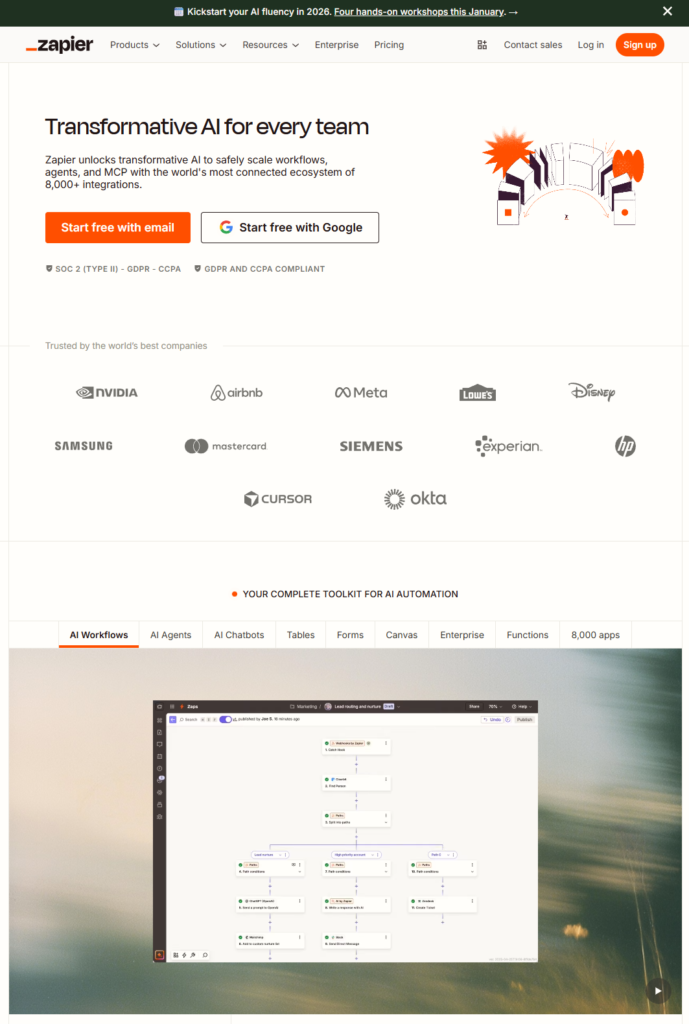
What Is Zapier? (The No-Jargon Explanation)
Zapier is an automation platform that connects your favorite apps and makes them work together automatically without any coding required.
Think of it as a digital assistant that watches for specific triggers in one app and automatically performs actions in other apps based on those triggers.
Here’s the simplest way to understand it:
IF this happens in App A → THEN do that in App B
For example:
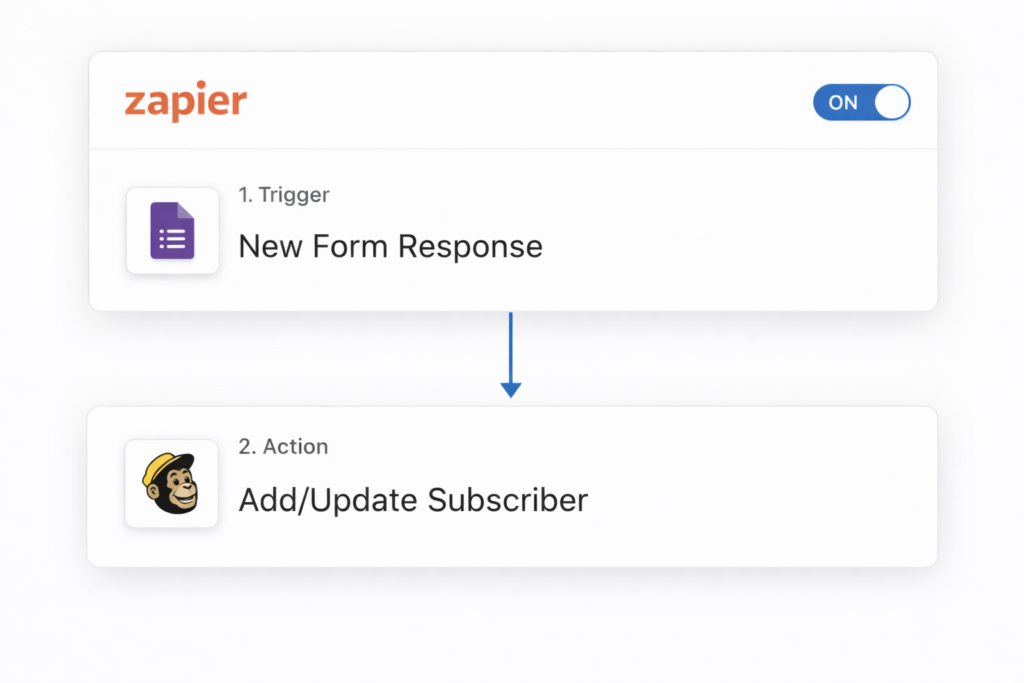
- IF someone fills out a Google Form → THEN add them to your Mailchimp email list
- IF you receive a payment in Stripe → THEN create an invoice in QuickBooks
- IF you’re tagged in a Slack message → THEN get a text message alert
- IF someone books a meeting in Calendly → THEN create a contact in your CRM
Zapier calls these automated workflows “Zaps.” Each Zap consists of:
- A Trigger: The event that starts the automation (like “new email received”)
- One or more Actions: What happens automatically as a result (like “save attachment to Google Drive”)
The magic of Zapier is that it sits in the cloud, constantly monitoring your apps for triggers and executing actions 24/7 even while you sleep. You set it up once, and it runs forever (or until you turn it off).
No coding. No technical knowledge. No API documentation to read.
You simply select your apps from Zapier’s library of 6,000+ integrations, choose what should trigger the automation, specify what actions should happen, and you’re done. Your apps are now talking to each other automatically.
Who Should Use Zapier?
Zapier is ideal for:
- Small business owners who wear multiple hats and need to automate repetitive administrative tasks
- Solopreneurs and freelancers who can’t afford to hire assistants but need to scale their operations
- Marketing professionals managing campaigns across multiple platforms (email, social media, CRM, analytics)
- Sales teams who need automatic lead capture, follow-up sequences, and CRM updates
- Content creators and influencers managing sponsorships, collaborations, and multi-platform publishing
- Customer service teams routing tickets, notifications, and updates between platforms
- E-commerce operators syncing orders, inventory, customer data, and fulfillment systems
- Remote teams coordinating workflows across project management, communication, and documentation tools
- Anyone spending 15+ minutes daily on repetitive digital tasks that involve moving information between apps
Top Features of Zapier

1. 6,000+ App Integrations
What it is: Zapier connects with virtually every major business application—from Gmail and Google Sheets to Salesforce, Shopify, WordPress, Slack, Trello, HubSpot, and thousands more.
Why it matters: You’re not limited to a small ecosystem. Whatever apps your business uses, Zapier probably supports them. New integrations are added weekly.
Real benefit: Build automation workflows using the exact tools you already use and pay for. No need to switch platforms or abandon familiar software just to achieve automation.
2. Multi-Step Zaps
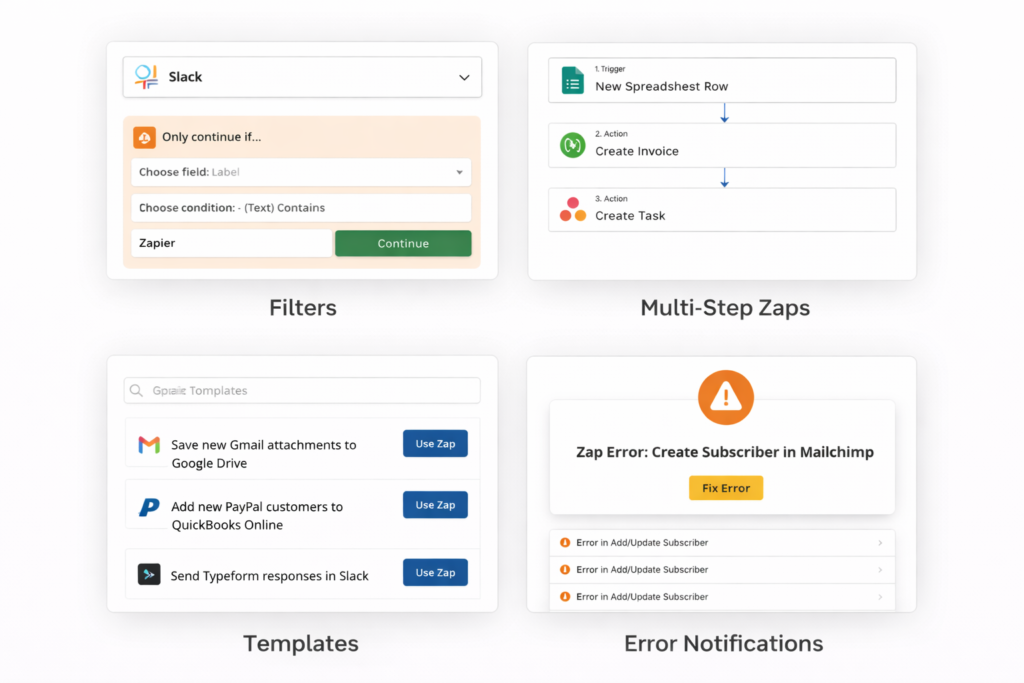
What it is: Create workflows with multiple actions following a single trigger. For example: When a sale occurs, automatically send a thank-you email, add the customer to your CRM, create a task in Asana, and log the transaction in Google Sheets—all from one Zap.
Why it matters: Real business processes involve multiple steps. Single-action automation is rarely enough to fully eliminate manual work.
Real benefit: Replace entire manual workflows with one automated sequence. What used to take 5-10 minutes of clicking through different apps now happens instantly and perfectly every time.
3. Filters and Conditional Logic
What it is: Add conditions to your Zaps so actions only happen when specific criteria are met. For instance, only send high-value leads to your sales CRM, or only create tasks for orders above a certain amount.
Why it matters: Not every trigger should result in the same action. Business logic often requires “if/then” decision-making.
Real benefit: Create sophisticated automation that handles different scenarios intelligently, just like a human assistant would—but without the potential for human error or oversight.
4. Built-In Apps and Utilities
What it is: Zapier includes tools like Formatter (for manipulating text and numbers), Delay (for scheduled actions), Email Parser (for extracting data from emails), and Paths (for creating branching logic).
Why it matters: Sometimes you need to transform data or add logic between apps. These built-in utilities handle common automation needs without requiring additional services.
Real benefit: Build more powerful workflows without subscribing to extra tools. Clean up messy data, schedule follow-ups, parse incoming information, and create complex branching scenarios all within Zapier.
5. Zap Templates
What it is: Pre-built automation workflows created by Zapier and the community for common use cases. Browse by app, industry, or business function, then customize to your needs.
Why it matters: You don’t need to design every automation from scratch or figure out what’s possible on your own.
Real benefit: Get started in minutes, not hours. Templates show you what’s possible and provide a working foundation you can adapt. Even experienced users use templates to discover creative automation ideas.
6. Team Collaboration Features
What it is: Share Zaps with team members, create shared folders, manage permissions, and track team automation usage from a central dashboard.
Why it matters: Automation shouldn’t be siloed. When team members can see and use each other’s Zaps, the entire organization benefits.
Real benefit: Scale automation across your business. New team members inherit proven workflows immediately. Changes to shared Zaps update everywhere automatically, maintaining consistency.
7. Error Handling and Monitoring
What it is: Zapier notifies you when Zaps encounter errors, maintains detailed logs of every action, and allows you to replay failed tasks once you’ve fixed the issue.
Why it matters: Automation only works if you can trust it. When something goes wrong, you need to know immediately and understand what happened.
Real benefit: Sleep peacefully knowing your automations are monitored. When errors occur (usually due to changed credentials or app updates), you’re alerted quickly and can resolve issues before they impact your business.
How Zapier Helps: Transform Your Business Operations
Reclaim 5-15 Hours Weekly
The average Zapier user automates 15-30 repetitive tasks. If each task takes 2 minutes and occurs 5 times weekly, that’s 150-300 minutes (2.5-5 hours) saved weekly—just from automating common workflows. Power users report saving 10-15+ hours weekly across their entire team.
Eliminate Human Error
When humans copy data between systems, mistakes happen. A mistyped email address, forgotten follow-up, or incomplete form transfer can cost sales, damage customer relationships, or create compliance issues. Automated workflows execute identically every single time with zero errors.
Scale Without Hiring
As your business grows, manual processes become bottlenecks. Zapier allows one person to handle workflows that would traditionally require multiple staff members. Solopreneurs manage operations that look like 5-person teams. Small teams punch above their weight class.
Respond Faster to Customers
Automated notifications, instant data syncing, and triggered follow-ups mean customers receive immediate responses even when you’re focused elsewhere. This responsiveness creates competitive advantage and improves customer satisfaction scores.
Maintain Clean, Synchronized Data
When data lives in multiple systems, keeping it synchronized manually is nearly impossible. Zapier ensures customer information, order details, inventory levels, and business metrics stay consistent across all your tools automatically.
Free Your Mind for Strategic Work
Perhaps the greatest benefit: your brain stops tracking repetitive tasks. You no longer think “I need to remember to add that to the spreadsheet” or “Did I send the follow-up email?” Your mental energy redirects toward strategy, creativity, and growth.
Ready to experience these benefits yourself? Start your free Zapier trial and automate your first workflow in under 10 minutes.
Real Use Cases: How People Actually Use Zapier
Case 1: The Overwhelmed Solopreneur
Before: Sarah runs a virtual coaching business. Every time someone booked a discovery call through Calendly, she manually: (1) added them to her CRM, (2) sent a welcome email with pre-call instructions, (3) created a folder in Google Drive for their materials, and (4) added the appointment to her client spreadsheet. This took 8-10 minutes per booking. With 15-20 bookings weekly, that was 2-3 hours of pure administrative work.
After: Sarah created a multi-step Zap: When someone books a Calendly appointment → automatically add them to Pipedrive CRM → send a customized welcome email via Gmail → create a named folder in Google Drive → log the appointment in Google Sheets.
Result: Sarah’s booking process now takes zero manual effort. She reclaimed 2-3 hours weekly, which she reinvested into client delivery and marketing. Client satisfaction improved because welcome emails arrive instantly instead of later in the day. Six months later, she scaled from 15 to 35 weekly sessions without feeling more overwhelmed.
Case 2: The E-Commerce Store Owner
Before: Mike’s Shopify store was growing, but order management was chaos. When high-value orders came in (over $500), he needed to personally review them for fraud, send a thank-you gift, and notify his fulfillment team via Slack. He was checking Shopify constantly and still missing some orders during busy periods.
After: Mike built a filtered Zap: When a new Shopify order exceeds $500 → send Mike an SMS alert → create a task in Asana for the fulfillment team → add the customer to a “VIP” segment in Klaviyo for special email sequences → log the order in Google Sheets for accounting.
Result: Zero high-value orders slip through the cracks. Mike’s fulfillment team gets instant notifications even when he’s unavailable. VIP customers automatically enter a special nurture sequence that’s increased repeat purchase rates by 23%. Mike checks Shopify twice daily instead of hourly.
Case 3: The Marketing Agency
Before: The agency managed 40+ client social media accounts. When clients emailed content or mentioned them on social media, someone had to manually track these requests, create tasks for the content team, and log them for billing. Requests frequently got lost in email threads or delayed because no one saw them immediately.
After: They created multiple Zaps: When clients email specific addresses → automatically parse the email → create a labeled task in Asana with attachments → notify the relevant team member in Slack → log the request in their time-tracking system.
Result: Client request response time dropped from 4-6 hours to under 30 minutes. Nothing falls through the cracks. Billing became more accurate because every request is automatically logged. The agency scaled from 25 to 40 clients without adding administrative staff.
Case 4: The Sales Team
Before: The sales team used multiple tools: leads came through website forms, Facebook ads, and trade shows. Sales reps manually entered lead info into Salesforce, then sent follow-up emails, then scheduled tasks for outreach. New leads often sat for 24-48 hours before anyone contacted them.
After: Created trigger-based Zaps for every lead source: New Facebook lead ad → instantly create Salesforce contact with source tag → send personalized email via Gmail → create a follow-up task for the assigned rep → send Slack notification to the team channel.
Result: Lead response time dropped from 24-48 hours to under 5 minutes. This alone increased conversion rates by 35% because leads were contacted while still hot. The sales team closed 40% more deals quarterly without working longer hours.
Case 5: The Content Creator
Before: Jessica publishes content across YouTube, Instagram, TikTok, her blog, and email list. Every time she published something, she manually: updated her content calendar, sent announcements across platforms, saved analytics, and updated her media kit. This fragmented workflow took 45 minutes per piece of content.
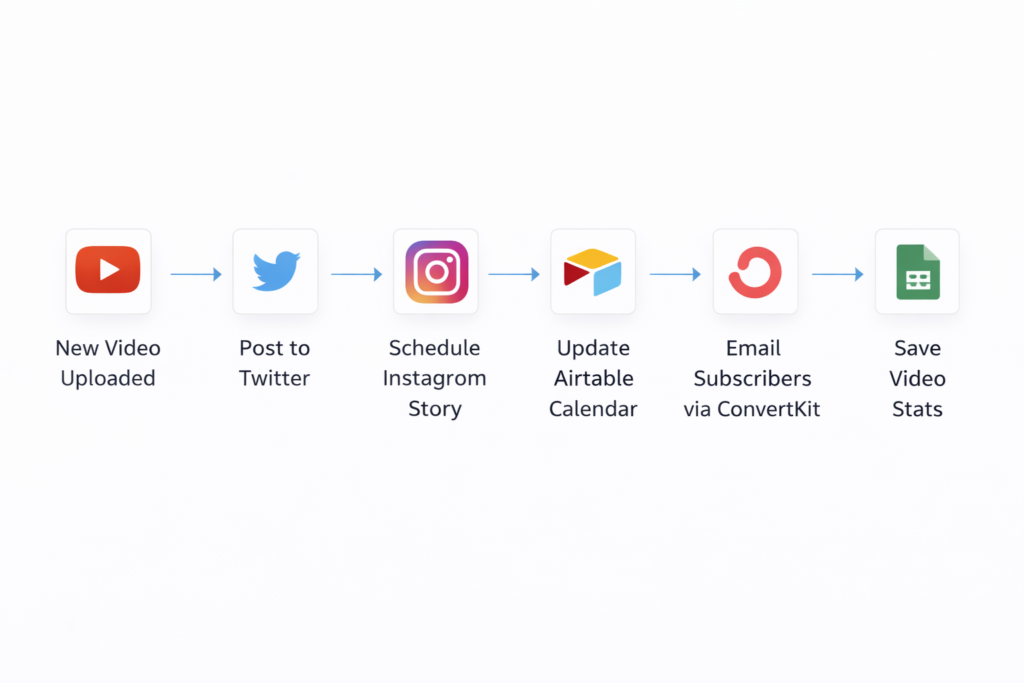
After: Built a workflow: When she uploads to YouTube → automatically post announcement to Twitter → schedule Instagram Story reminder → add video details to her Airtable content calendar → send email notification to subscribers via ConvertKit → save video stats to Google Sheets.
Result: Publishing workflow dropped from 45 minutes to under 5 minutes (just the initial YouTube upload). Jessica publishes 50% more content with the same effort because distribution is automated. Her media kit updates automatically, saving hours during sponsorship negotiations.
Pricing & Plans: What Zapier Actually Costs
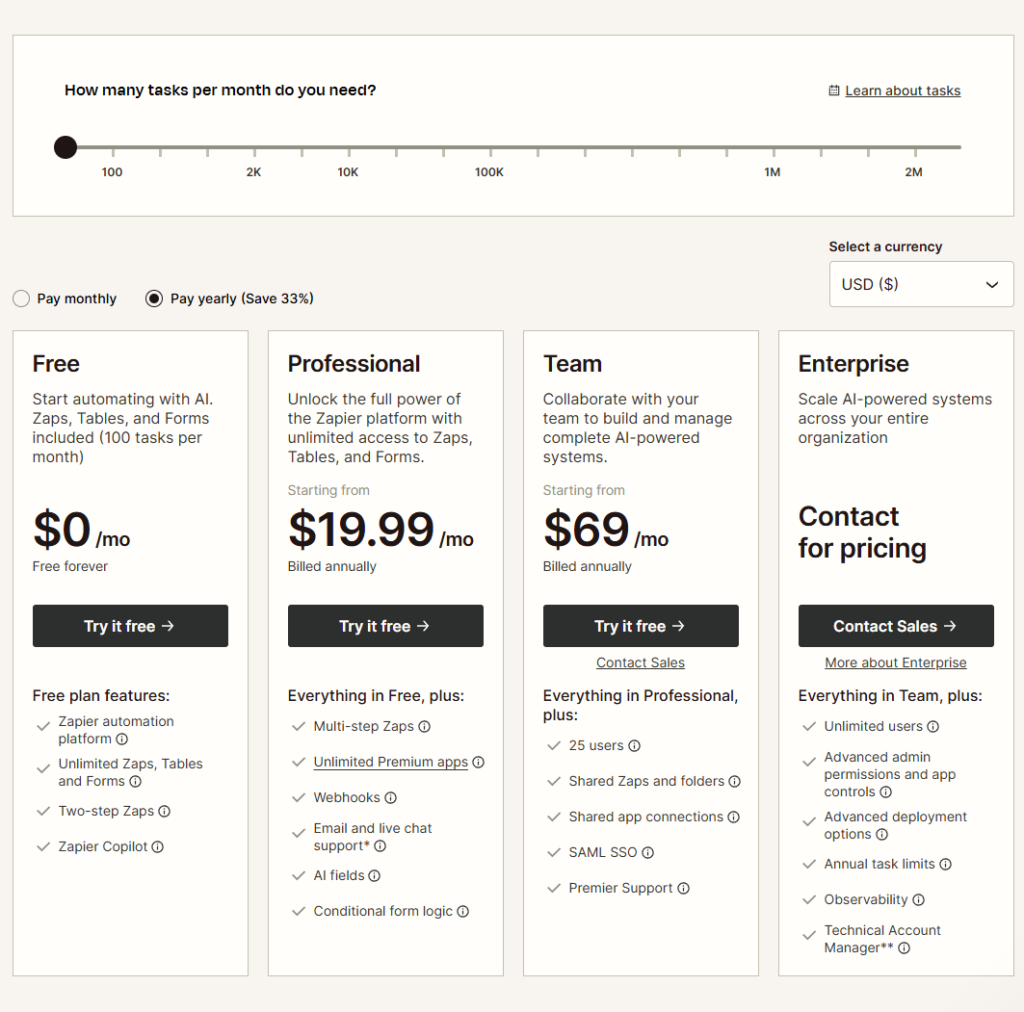
🚀 Zapier Pricing Plans (Billed Yearly — Save 33%)
Free Plan — Best for Beginners
Perfect for testing Zapier and running simple automations.
Price: $0/month (Free forever)
Includes: 100 tasks/month
Features:
- Zapier automation platform
- Unlimited Zaps, Tables, and Forms
- Two-step Zaps
- Zapier Copilot
Professional Plan — Best for Most Users
Best choice for freelancers and businesses needing multi-step automation and premium apps.
Starting from: $19.99/month (billed annually)
Everything in Free, plus:
- Multi-step Zaps
- Unlimited Premium apps
- Webhooks
- Email and live chat support**
- AI fields
- Conditional form logic
Team Plan — Best for Collaboration
Great for teams managing automations together with shared access and admin controls.
Starting from: $69/month (billed annually)
Everything in Professional, plus:
- 25 users
- Shared Zaps and folders
- Shared app connections
- SAML SSO
- Premier Support
Enterprise Plan — For Large Organizations
Built for scaling automation across the whole organization with advanced security and support.
Price: Contact for pricing
Everything in Team, plus:
- Unlimited users
- Advanced admin permissions and app controls
- Advanced deployment options
- Annual task limits
- Observability
- Technical Account Manager**
Pros & Cons: The Honest Assessment
PROS:
Incredibly user-friendly for non-technical users – The visual workflow builder uses drag-and-drop simplicity. If you can use email, you can build Zaps. No coding, no API documentation, no technical knowledge required.
Massive app library with 6,000+ integrations – More connections than any competitor, covering virtually every popular business tool. From mainstream apps like Gmail and Slack to niche industry-specific platforms.
Reliable and stable performance – Zapier has been operating since 2011 with 99.9%+ uptime. Your automations run 24/7 without supervision. The platform is mature, tested, and trusted by millions.
Scales from beginner to enterprise – Start with simple single-step Zaps and graduate to complex multi-step workflows with conditional logic as your needs grow. The platform grows with you.
Exceptional documentation and community – Every app integration includes detailed guides. The Zapier Community provides real-world examples. Support is responsive and helpful.
Proven ROI and time savings – Users consistently report 5-15 hours saved weekly. For businesses, this translates to thousands of dollars annually in reclaimed productivity.
Regular updates and new integrations – Zapier continuously adds new apps, features, and improvements. Your automation capabilities expand over time without additional effort.
Security and compliance features – SOC 2 certified, GDPR compliant, with enterprise-grade security. Your data is handled responsibly with encryption and access controls.
CONS:
Because Zapier prioritizes ease-of-use and no-code accessibility, it processes automations with slight delays (typically 1-15 minutes depending on your plan tier). For workflows requiring instant, real-time synchronization—like live chat integrations or time-sensitive trading—this may not be ideal. However, for 95% of business workflows, these delays are completely unnoticeable and don’t impact operations.
Because Zapier offers extensive app integrations and powerful features, the pricing scales with usage through task limits. Heavy automation users may find costs increasing as they automate more processes. However, this usage-based model ensures you only pay for the value you receive, and the time savings typically far exceed the subscription cost.
Because Zapier focuses on connecting apps through their public APIs, some complex or highly specific workflows may require workarounds or additional tools. Power users with very specialized technical needs might occasionally hit limitations. However, the platform includes Webhooks and Code actions for extending capabilities when needed.
Ready to automate your work in minutes? Try Zapier
Zapier vs Alternatives: How Does It Compare?
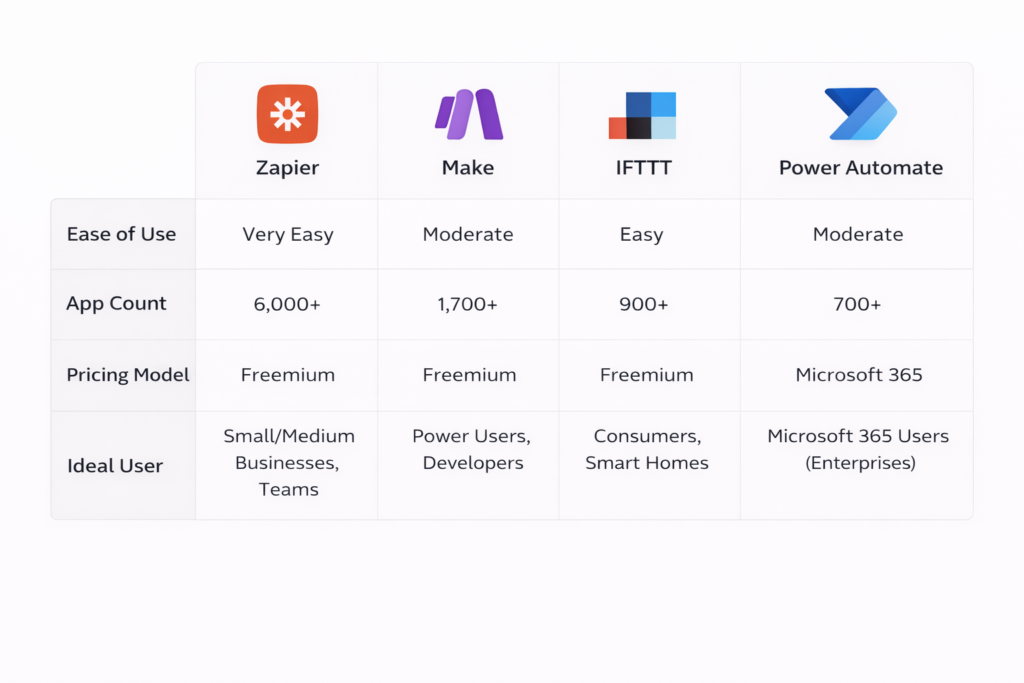
Zapier vs. Make (formerly Integromat)
Make offers similar automation capabilities with potentially more advanced features for technical users, including built-in data transformation tools and more complex branching logic.
Choose Zapier if: You value simplicity, user-friendliness, and the largest app library. Zapier’s interface is more intuitive for non-technical users, and you’ll find integrations for virtually any tool.
Zapier vs. IFTTT (If This Then That)
IFTTT focuses primarily on consumer apps and IoT devices (smart home, social media, mobile apps) with very simple automation.
Choose Zapier if: You’re automating business processes, need multi-step workflows, or require professional/business app integrations. Zapier is explicitly designed for business users.
Zapier vs. Microsoft Power Automate
Power Automate (formerly Microsoft Flow) is Microsoft’s automation platform, deeply integrated with Microsoft 365 and Azure services.
Choose Zapier if: You use a diverse ecosystem of apps beyond Microsoft, need platform independence, or want more user-friendly setup. Zapier works beautifully across Mac, PC, and any operating system.
The Bottom Line: Zapier wins on simplicity, app variety, and cross-platform compatibility. It’s the best choice for most small-to-medium businesses, solopreneurs, and teams using diverse tools. Alternatives may serve specific niches (consumer automation, Microsoft-heavy enterprises, or technical power users) better.ZZ
Ready to automate your work in minutes? Try Zapier
How to Get Started with Zapier (Step-by-Step)
Step 1: Sign Up for Your Free Account
Visit Zapier’s website and click “Sign Up.” You can register using your Google account, Microsoft account, or email address. No credit card required for the free plan.
Step 2: Choose Your First Automation
Zapier offers two starting paths:
Option A – Use a Template: Browse pre-built Zap templates by searching for your apps or use cases. Templates give you working automations you can customize immediately.
Option B – Create from Scratch: Click “Create Zap” to build a custom automation. You’ll select your trigger app first, then your action app(s).
Beginner recommendation: Start with a template. It’s faster and shows you how Zapier works.
Step 3: Connect Your Apps
When you select apps, Zapier will ask you to authenticate and grant access. Click “Sign in” and follow the standard OAuth process for each app. You’re granting Zapier permission to perform actions on your behalf.
This is secure—Zapier uses industry-standard authentication. You can revoke access anytime from your app’s settings.
Step 4: Configure Your Trigger
Select what event should start the automation. For example, if you chose Gmail as your trigger app, you might select “New Email” or “New Email Matching Search.”
Zapier will pull a sample from your account to show what data is available. This helps you understand what information flows through the automation.
Step 5: Set Up Your Action(s)
Choose what should happen when the trigger fires. Map fields from your trigger to your action app. For example, if someone fills out a form, you might map their email address to create a contact in your CRM.
Zapier’s interface shows you available fields and lets you customize the data being sent.
Step 6: Test Your Zap
Before turning your Zap on, test it. Zapier will run through the workflow once using real data to ensure everything works correctly. Fix any errors that appear (usually mapping issues or permission problems).
Step 7: Turn On Your Zap
Once testing succeeds, toggle your Zap “On.” It’s now running automatically in the background. Zapier monitors for your trigger and executes actions 24/7.
Optimization Tip: After your first Zap runs successfully for a few days, check the Task History. You’ll see exactly what’s happening and can refine your filters or add additional steps based on real-world usage patterns.
Ready to automate your first workflow? Get started with Zapier now—your first automation can be running in under 10 minutes.
Final Verdict: Is Zapier Worth It?
For solopreneurs and freelancers: Absolutely worth it. The time savings alone justify the cost within the first month. If you’re manually performing the same digital tasks repeatedly, Zapier will reclaim 5-10 hours weekly minimum—time you can spend on client work, business development, or personal life.
For small businesses (2-10 people): Essential. As you grow, automation becomes the difference between scaling smoothly and drowning in operations. Zapier allows small teams to operate with the efficiency of much larger organizations. The Professional plan typically delivers 10x-20x ROI.
For marketing and sales professionals: A game-changer. The ability to automatically capture leads, sync data across platforms, trigger follow-ups, and maintain clean CRM data directly impacts revenue. Most marketing teams report that Zapier pays for itself through improved conversion rates alone.
For e-commerce operators: Highly valuable. Order processing, inventory management, customer communication, and fulfillment coordination involve countless manual steps. Automating even 30% of these workflows eliminates bottlenecks and errors that cost sales.
For enterprise teams: Strategic investment. The Team and Company plans provide centralized control, security features, and scalability that make organization-wide automation manageable. The cost per user is minimal compared to the productivity gains.
For casual users with minimal repetitive tasks: Probably not necessary yet. If you’re only doing a few manual tasks weekly, the free plan might suffice, but paid plans won’t deliver significant value. Wait until your workflow complexity increases.
The Bottom Line
Zapier delivers on its promise: automation for everyone, regardless of technical ability. The platform is mature, reliable, and continuously improving. The app library is unmatched. The user experience is genuinely friendly for beginners while remaining powerful for advanced users.
The investment is straightforward: Zapier costs $20-75 monthly for most users. If it saves you 5-10 hours monthly, and your time is worth $25-50 hourly, that’s $125-500 in value. The ROI is clear.
More importantly, automation isn’t just about time savings—it’s about consistency, reduced stress, fewer errors, and the ability to scale without proportionally increasing workload. Zapier removes repetitive tasks from your mental workload, freeing your attention for strategy, creativity, and growth.
Stop Copying and Pasting: Automate Your Workflow Today
You’ve seen how Zapier works. You understand the benefits, pricing, and trade-offs. You’ve read real examples of businesses transforming their operations.
Now the question is simple: How much longer will you manually perform tasks that could be automated?
Here’s what happens next:
- Click here to start your free Zapier account
- Choose one repetitive task you do daily (just one!)
- Build or customize a Zap template in 5-10 minutes
- Watch that task disappear from your to-do list forever
No credit card required for the free plan. No commitment. No risk.
The free plan includes 100 tasks monthly—enough to automate 3-5 basic workflows completely. If Zapier doesn’t immediately improve your workflow, simply stop using it. But here’s what most users discover: once you automate your first workflow successfully, you’ll immediately see 10 more opportunities. Automation becomes addictive because the benefits are so obvious.
Your competitors are already automating. Your time is too valuable to spend on copy-paste work. Start automating today.
FAQs: Your Zapier Questions Answered
Does Zapier work with my apps?
Almost certainly yes. Zapier connects with 6,000+ apps including all major platforms: Gmail, Google Workspace, Microsoft 365, Slack, Salesforce, HubSpot, Shopify, WordPress, Mailchimp, Stripe, QuickBooks, Trello, Asana, and thousands more. You can search Zapier’s app directory to confirm specific integrations. New apps are added weekly, and you can request integrations for apps not yet supported.
Do I need coding skills to use Zapier?
No, absolutely not. Zapier is specifically designed for non-technical users. The entire interface uses visual, drag-and-drop building. You select apps from menus, click through options, and map fields by clicking. If you can use email and fill out web forms, you can build Zaps. For advanced users, Zapier does offer Code actions (Python or JavaScript) for complex customization, but 99% of users never need this feature.
Is my data secure with Zapier?
Yes. Zapier is SOC 2 Type II certified and GDPR compliant with enterprise-grade security. Your authentication credentials are encrypted and never stored in plain text. Zapier accesses your apps using secure OAuth tokens. Data transmitted between apps is encrypted in transit. Zapier doesn’t read or store your actual email content, documents, or files—it only processes the metadata and information necessary to perform the automation you configured. Zapier has operated since 2011 without major security breaches.
What’s the difference between tasks and Zaps?
A “Zap” is the automated workflow you create—the entire recipe. A “task” is one action performed by a Zap. If your Zap has one trigger and two actions, each time it runs counts as two tasks. For example: “When I get a new email → save the attachment to Dropbox → send me a Slack notification” uses two tasks per execution. Zapier’s pricing is based on task usage because more complex automations (with more steps) use more server resources.
How often do Zaps run? Is it instant?
Zap speed depends on your plan tier. Free and Starter plans check for new triggers every 15 minutes. Professional plans check every 2 minutes. Team and Company plans check every 1 minute. For most business workflows, these delays are completely acceptable—email notifications arriving in 2-15 minutes instead of instantly rarely matters. Some premium apps offer “instant” triggers using webhooks, which fire immediately when events occur, regardless of plan tier.
Can I share Zaps with my team?
Yes, on Professional plans and above. You can create shared folders containing Zaps that multiple team members can access, edit, and monitor. This is perfect for ensuring consistent workflows across your organization. You can also transfer Zap ownership between team members. On Team and Company plans, you get additional admin controls for managing permissions and monitoring team usage.
What happens if a Zap fails or encounters an error?
Zapier sends you email notifications when Zaps encounter errors. The most common causes are: changed login credentials, apps being temporarily down, or changes to app APIs. When errors occur, Zapier holds the failed task for 1-2 weeks (depending on your plan), allowing you to fix the issue and replay the task. The Task History shows detailed logs of exactly what happened, making troubleshooting straightforward. Most errors are resolved in minutes by reconnecting your account or adjusting a field mapping.


Leave a Reply